
• Hype
  • Murai
  • Lipstiq
  • Varnam
  • Hangat
  • Autofreaks
Lowyat.NET
  • News
    • Lifestyle
    • Computing
    • Hardware
    • Internet
    • Rumours & Leaks
    • Software
  • Forums
    • Kopitiam
    • Tradezone
    • Property Talk
    • Finance & Business
    • Fast and Furious
  • Gaming
    • PC Gaming
    • Console
    • Esports
  • Mobile
    • Apps
    • OS
    • Tablets
    • Phones
    • Telco
      • Celcom
      • DiGi
      • Maxis
      • Tune Talk
      • U Mobile
      • Buzzme
  • Pricelists
    • Compu-zoneUpdated
    • ViewnetUpdated
    • Sri ComputersUpdated
    • StartecUpdated
  • More
    • Automotive Tech
    • Drone
    • Enterprise
    • Entertainment
    • Fashion
    • E-Hailing
    • Wearables
No Result
View All Result
Lowyat.NET
  • News
    • Lifestyle
    • Computing
    • Hardware
    • Internet
    • Rumours & Leaks
    • Software
  • Forums
    • Kopitiam
    • Tradezone
    • Property Talk
    • Finance & Business
    • Fast and Furious
  • Gaming
    • PC Gaming
    • Console
    • Esports
  • Mobile
    • Apps
    • OS
    • Tablets
    • Phones
    • Telco
      • Celcom
      • DiGi
      • Maxis
      • Tune Talk
      • U Mobile
      • Buzzme
  • Pricelists
    • Compu-zoneUpdated
    • ViewnetUpdated
    • Sri ComputersUpdated
    • StartecUpdated
  • More
    • Automotive Tech
    • Drone
    • Enterprise
    • Entertainment
    • Fashion
    • E-Hailing
    • Wearables
No Result
View All Result
Lowyat.NET
No Result
View All Result
Home Fintech

This Is How To Enable ShopeePay For Apple App Store and Services

The e-wallet can now be used to pay for apps, content, and subscriptions within the Apple’s universe.

by Chief Chapree
March 16, 2023
ShopeePay - Apple App Store - Apple ID
17
SHARES
Share on WhatsappShare on TelegramThreads

Shopee today announced that the ShopeePay e-wallet can now be used to purchase apps and subscriptions from the Apple App Store. At the same time, users can also utilize it to pay for Apple services including One, Arcade, Fitness+, iCloud+, Music, and TV+.

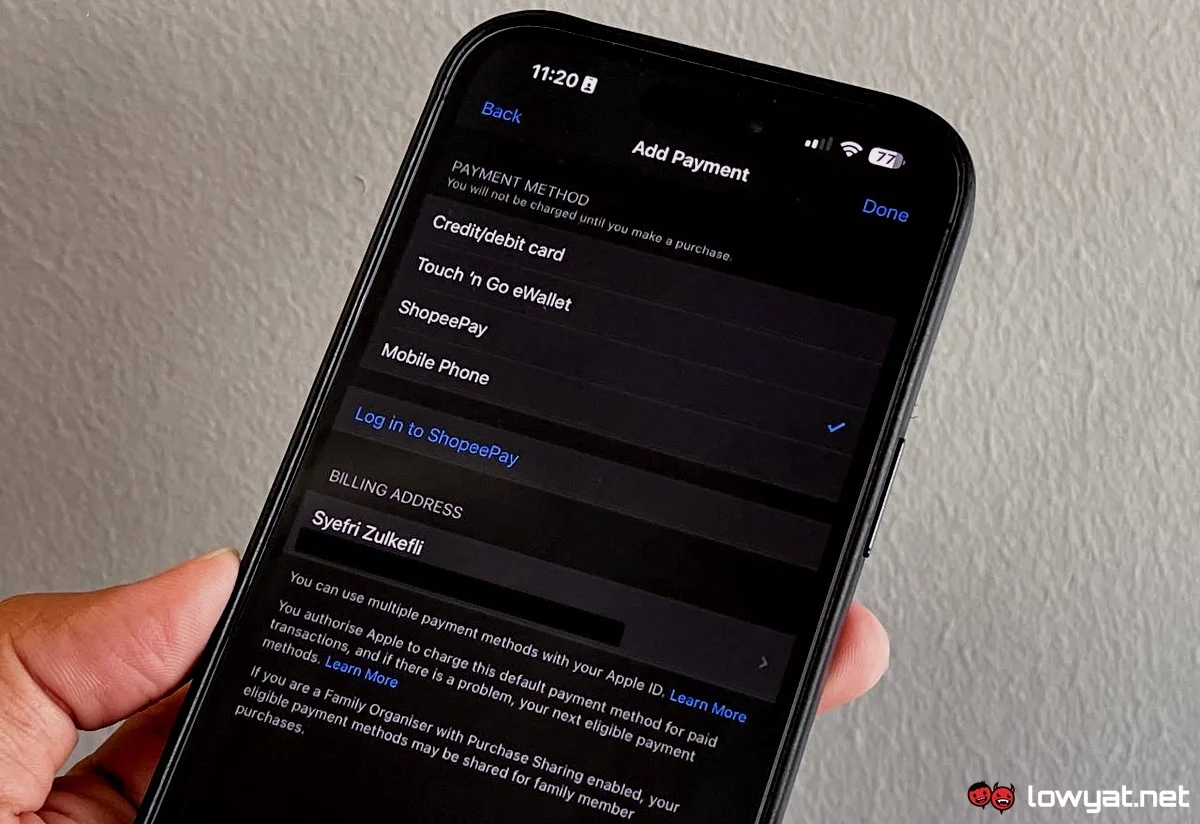
In order to utilize ShopeePay for the App Store and Apple services, you must first link the e-wallet with your Apple ID. To do this, head on to the Settings inside your iPhone or iPad and tap on your Apple ID profile.
ShopeePay - Apple App Store - Apple ID

From there, choose the Payment & Shipping option and then tap on Add Payment Method. You then should be able to see ShopeePay in the list and to proceed, tap on the Log in to ShopeePay.

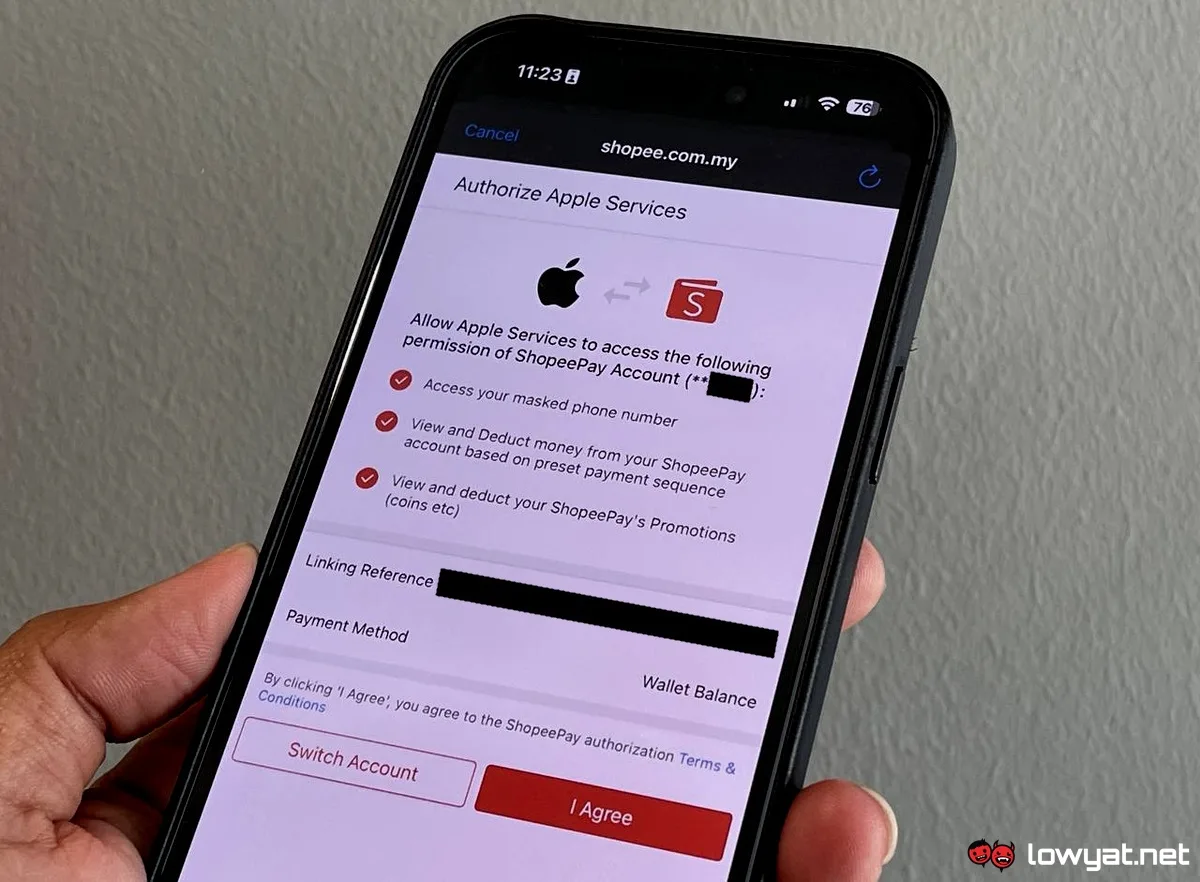
The activation process would then continue on a web browser that would open up Shopee’s website. From there, you would be asked to log in via your mobile number.
ShopeePay - Apple App Store - Apple ID

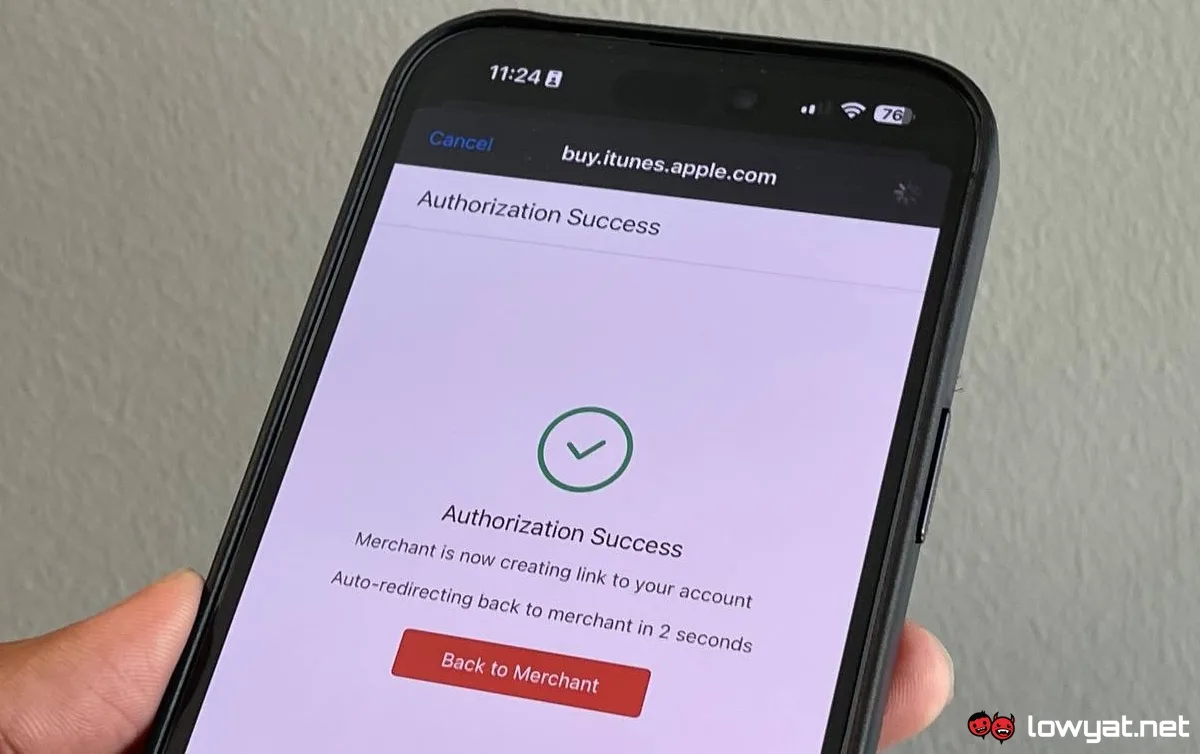
Once you sort out the OTP verification (we were asked to perform it twice using SMS AND e-mail), the Authorize Apple Services screen would then appear in the browser. Tap on the I Agree button, enter your ShopeePay PIN number, and the Authorization Success screen should appear.

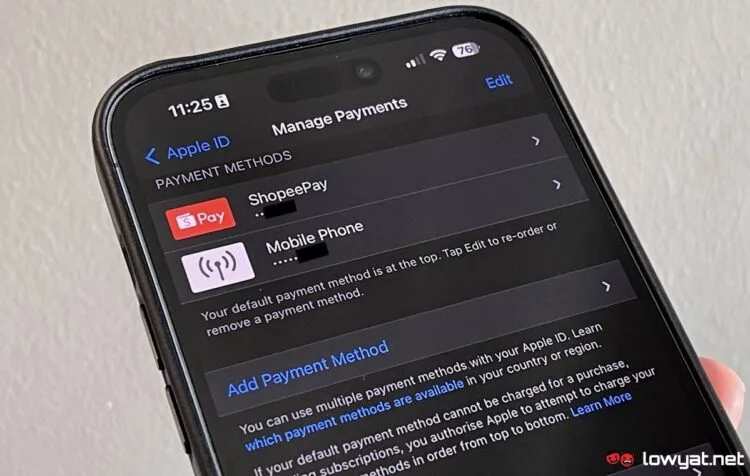
You would then be able to see ShopeePay being listed under the Payment Methods within the Manage Payments section inside your iPhone or iPad settings. Alternatively, you can also link ShopeePay with your Apple ID through the App Store on Mac or iTunes on Windows PC.
In case you still feel doubtful whether what we showed above is legitimate or otherwise, the e-wallet has already been listed on Apple’s support document as one of the supported payment methods in Malaysia. Prior to this, Apple accepted TNG eWallet and debit & credit cards for payments as well as telco billing on Celcom, Digi, Maxis, & U Mobile.

RELATED:  Apple Reportedly Hosting Its First Event Of The Year On 4 March

The new ShopeePay and Apple ID integration once again highlighted the level of relationship that the popular e-commerce platform has with the Cupertino giant. Previously, Shopee was already one of the first e-commerce outfits in the country to support Apple Pay right on its Malaysian launch day.

Filed Under AppleApple App Storeapple arcadeapple fitness+apple icloudapple malaysiaApple Musicapple oneapple tvshopeeshopee malaysiashopeepay
Updated 1:06 pm, Thu, 16 March 23
http://lowy.at/wqPoy
SendShareShareShare7Tweet4

Follow us on Instagram, Facebook, Twitter or Telegram for more updates and breaking news. 

No Result
View All Result

TRENDING THIS WEEK

  1. 1
    Fintech

    TNG Digital Retracts RON95 Subsidy Initiative, Issues Apology

  2. 2
    Fintech

    TNG eWallet Gets Physical Customer Service Hub At Kota Raya

  3. 3
    Automotive

    BYD Reportedly Reconsidering Tanjung Malim CKD Plans

  4. 4
    Telco

    China Mobile’s CMLink Now Offers Prepaid Plans In Malaysia; Priced From RM25/Month

  5. 5
    Automotive

    Tesla Officially Launches Model Y L In Malaysia; Pricing To Start From RM260,000

NETWORK

  • Hype
  • Murai
  • Lipstiq
  • Varnam
  • Hangat
  • Autofreaks

ABOUT

  • Advertise
  • Careers
  • Privacy Statement
  • Editorial Policy
  • Terms of Use
  • Contact Us

©2026 VIJANDREN RAMADASS. ALL RIGHTS RESERVED.

No Result
View All Result
  • News
  • Forums
  • Laptops
  • Telco
  • Mobile
  • Gaming
  • Banking
  • Fintech
  • Artificial Intelligence
  • Cryptocurrency
  • Cyber Security
  • Hybrid Vehicles
  • Advertise with Us

©2026 VIJANDREN RAMADASS. ALL RIGHTS RESERVED.

No Result
View All Result
  • News
  • Forums
  • Laptops
  • Telco
  • Mobile
  • Gaming
  • Banking
  • Fintech
  • Artificial Intelligence
  • Cryptocurrency
  • Cyber Security
  • Hybrid Vehicles
  • Advertise with Us

©2026 VIJANDREN RAMADASS. ALL RIGHTS RESERVED.