
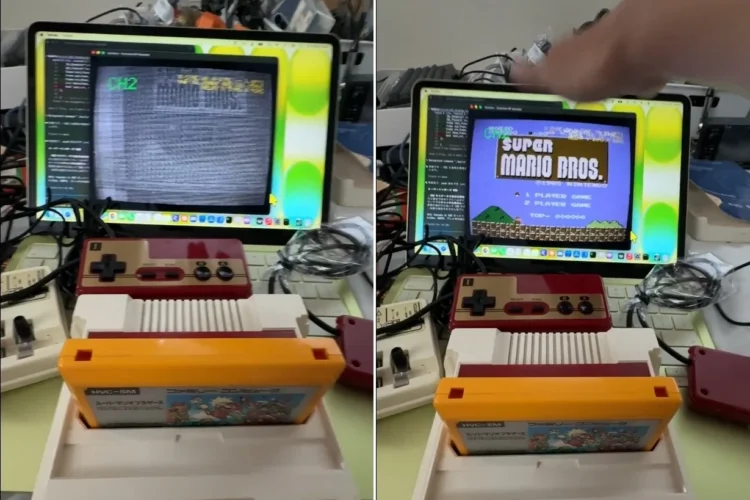
If you are old enough to remember CRT TVs, you’d probably be very appreciative of the display technology that we have today. But for those looking for a nostalgia fix – or looking for a way to get their kids to experience the olden days – there’s an emulator for that experience. For now, it looks to only be for macOS, but it is so complete that it even includes the percussive maintenance experience. Another catch is that you’ll also need something that outputs the old signals of the day, like an original Famicom / NES.
The maker of this CRT emulator goes by GOROman on X, a software engineer with Sega and Facebook listed as former places of employment. The project initially started simply showcasing CRT effects like flickering, noise and aberrations. But rather than being annoyances that you just deal with, the prior demo clip shows these to be constant, to the point of being unusable. Since then the emulation has been updated to allow you to give the screen a slap to fix the picture quality.
Of course, CRT screens of yesteryear work very differently from the displays of today, even on the signal level. The short version of the explanation is that the VHF RF output from the Famicom / NES is being sent to an open-source software-defined radio (SDR) receiver, dubbed the HackRF One. This analogue signal then goes through the emulator software, which emulates the way analogue TVs process these signals. The signal frequency is then exaggerated to achieve the excessive flickering, noise and aberrations. Responding to feedback, GOROman then added on the aforementioned percussive maintenance feature to “fix” the wonky image.
If you were wondering what sort of mechanism the emulator uses to simulate the impact of physically slapping a CRT TV, Tom’s Hardware reports seeing an input variable called “audio tap” in the code of the emulator. This means, as far as this emulator is concerned, it’s possible to fix the image you see by clapping your hands near it. And that’s probably better than striking a modern display, especially if it’s of the OLED variety. At any rate, if you want to, you can check out the emulator on your own by heading to its GitHub page, linked below.
(Source: GOROman / X [1], [2], GitHub, Tom’s Hardware)
