
Thursday, November 13, 2025
  • Hype
  • Murai
  • Lipstiq
  • Wanista
  • Varnam
  • Hangat
  • Autofreaks
Lowyat.NET
  • News
    • Lifestyle
    • Computing
    • Hardware
    • Internet
    • Rumours & Leaks
    • Software
  • Forums
    • Kopitiam
    • Tradezone
    • Property Talk
    • Finance & Business
    • Fast and Furious
  • Gaming
    • PC Gaming
    • Console
    • Esports
  • Mobile
    • Apps
    • OS
    • Tablets
    • Phones
    • Telco
      • Celcom
      • DiGi
      • Maxis
      • Tune Talk
      • U Mobile
      • Buzzme
  • Pricelists
    • Compu-zoneUpdated
    • ViewnetUpdated
    • Sri ComputersUpdated
    • StartecUpdated
  • More
    • Automotive Tech
    • Drone
    • Enterprise
    • Entertainment
    • Fashion
    • E-Hailing
    • Wearables
No Result
View All Result
Lowyat.NET
  • News
    • Lifestyle
    • Computing
    • Hardware
    • Internet
    • Rumours & Leaks
    • Software
  • Forums
    • Kopitiam
    • Tradezone
    • Property Talk
    • Finance & Business
    • Fast and Furious
  • Gaming
    • PC Gaming
    • Console
    • Esports
  • Mobile
    • Apps
    • OS
    • Tablets
    • Phones
    • Telco
      • Celcom
      • DiGi
      • Maxis
      • Tune Talk
      • U Mobile
      • Buzzme
  • Pricelists
    • Compu-zoneUpdated
    • ViewnetUpdated
    • Sri ComputersUpdated
    • StartecUpdated
  • More
    • Automotive Tech
    • Drone
    • Enterprise
    • Entertainment
    • Fashion
    • E-Hailing
    • Wearables
No Result
View All Result
Lowyat.NET
No Result
View All Result
Home Computing

Microsoft Wants Windows 10 To Work Without Passwords

by John Law
July 12, 2019
380
SHARES
Share on FacebookShare on Twitter

Microsoft is adamant on ditching the age-old security measure that is the password. To that end, the popular software brand is pushing for its Windows 10 OS to go “passwordless”, and that may soon become a reality in the next major update.

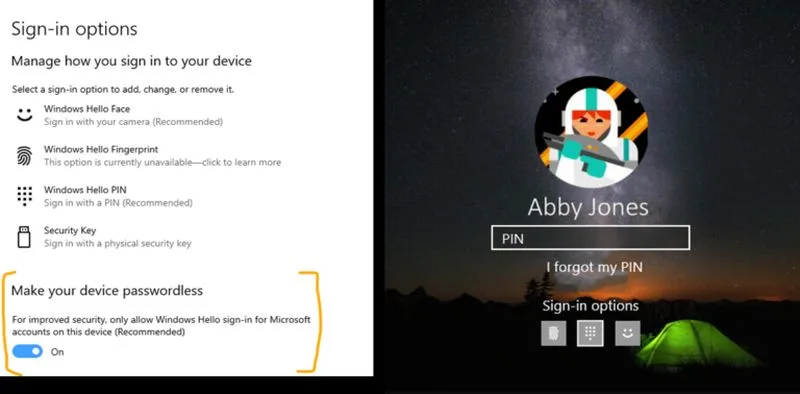
As it stands, Microsoft is already testing out the feature in the latest Windows 10 Insider Preview Build 18936 (20H1). Mention of the feature is found halfway through the article; for Windows 10 users inside the Fast Ring program, they’ll be able to activate the option by heading into Settings > Accounts > Sign-in options, and then turning on the “Make your device passwordless”.

With passwords out of the way, PCs running Windows 10 will simply resort to face authentication, fingerprints, or a PIN code. The primary reason why Microsoft just doesn’t want to use passwords anymore is simple: it’s not as safe as people think.
In practice, a password is like a double-edged sword; yes, the convenience of using a passphrase only we know does provide some measure of security. Unfortunately, because of this convenience, people have a habit of reusing this password across a multitude of platforms. Even worse, many people still don’t pair their passwords with some method of authentication.

Microsoft isn’t just aiming the feature towards just the consumer market either. It’s also planning on extending the feature towards business users via its Azure Active Directory. Like its non-commercial counterpart, this feature will also allow businesses to go passwordless and opt to use security keys, authenticators, or Windows Hello too.

(Source: Microsoft via The Verge)

Filed Under microsoftWindows 10Windows 10 Security
Updated 7:00 pm, Fri, 12 July 19
http://lowy.at/JIQ2m
Share152Tweet95SendShare

Follow us on Instagram, Facebook, Twitter or Telegram for more updates and breaking news. 

No Result
View All Result

TRENDING THIS WEEK

  1. 1
    Drone

    DJI Neo 2 Lands In Malaysia; Starts From RM899

  2. 2
    Transportation

    First Phase Of Johor Bahru-Singapore RTS Link Trials To Begin In December Without Passengers

  3. 3
    Automotive

    GWM Confirms Wey G9 PHEV MPV To Launch In Malaysia

  4. 4
    Branded

    You Can Now Own A Samsung Galaxy A07 For Free With CelcomDigi

  5. 5
    Electric Vehicles

    Tesla Expands Its Presence To East Malaysia

NETWORK

  • Hype
  • Murai
  • Lipstiq
  • Wanista
  • Varnam
  • Hangat
  • Autofreaks

ABOUT

  • Advertise
  • Careers
  • Privacy Statement
  • Contact Us
  • Editorial Policy
  • Terms & Conditions

©2025 VIJANDREN RAMADASS. ALL RIGHTS RESERVED.

No Result
View All Result
  • News
    • Lifestyle
    • Computing
    • Hardware
    • Internet
    • Rumours & Leaks
    • Software
  • Forums
    • Kopitiam
    • Tradezone
    • Property Talk
    • Finance & Business
    • Fast and Furious
  • Gaming
    • PC Gaming
    • Console
    • Esports
  • Mobile
    • Apps
    • OS
    • Tablets
    • Phones
    • Telco
      • Celcom
      • DiGi
      • Maxis
      • Tune Talk
      • U Mobile
      • Buzzme
  • Pricelists
    • Compu-zone
    • Viewnet
    • Sri Computers
    • Startec
  • More
    • Automotive Tech
    • Drone
    • Enterprise
    • Entertainment
    • Fashion
    • E-Hailing
    • Wearables

©2025 VIJANDREN RAMADASS. ALL RIGHTS RESERVED.

No Result
View All Result
  • News
    • Lifestyle
    • Computing
    • Hardware
    • Internet
    • Rumours & Leaks
    • Software
  • Forums
    • Kopitiam
    • Tradezone
    • Property Talk
    • Finance & Business
    • Fast and Furious
  • Gaming
    • PC Gaming
    • Console
    • Esports
  • Mobile
    • Apps
    • OS
    • Tablets
    • Phones
    • Telco
      • Celcom
      • DiGi
      • Maxis
      • Tune Talk
      • U Mobile
      • Buzzme
  • Pricelists
    • Compu-zone
    • Viewnet
    • Sri Computers
    • Startec
  • More
    • Automotive Tech
    • Drone
    • Enterprise
    • Entertainment
    • Fashion
    • E-Hailing
    • Wearables

©2025 VIJANDREN RAMADASS. ALL RIGHTS RESERVED.