
• Hype
  • Murai
  • Lipstiq
  • Varnam
  • Hangat
  • Autofreaks
Lowyat.NET
  • News
    • Lifestyle
    • Computing
    • Hardware
    • Internet
    • Rumours & Leaks
    • Software
  • Forums
    • Kopitiam
    • Tradezone
    • Property Talk
    • Finance & Business
    • Fast and Furious
  • Gaming
    • PC Gaming
    • Console
    • Mobile Gaming
    • Esports
  • Mobile
    • Apps
    • OS
    • Tablets
    • Phones
    • Telco
      • Celcom
      • DiGi
      • Maxis
      • Tune Talk
      • U Mobile
      • Buzzme
  • Pricelists
    • Compu-zoneUpdated
    • ViewnetUpdated
    • Sri ComputersUpdated
    • StartecUpdated
  • More
    • Artificial Intelligence
    • Automotive Tech
    • Drone
    • Enterprise
    • Entertainment
    • Fashion
    • E-Hailing
    • Wearables
    • Contact Us
No Result
View All Result
Lowyat.NET
  • News
    • Lifestyle
    • Computing
    • Hardware
    • Internet
    • Rumours & Leaks
    • Software
  • Forums
    • Kopitiam
    • Tradezone
    • Property Talk
    • Finance & Business
    • Fast and Furious
  • Gaming
    • PC Gaming
    • Console
    • Mobile Gaming
    • Esports
  • Mobile
    • Apps
    • OS
    • Tablets
    • Phones
    • Telco
      • Celcom
      • DiGi
      • Maxis
      • Tune Talk
      • U Mobile
      • Buzzme
  • Pricelists
    • Compu-zoneUpdated
    • ViewnetUpdated
    • Sri ComputersUpdated
    • StartecUpdated
  • More
    • Artificial Intelligence
    • Automotive Tech
    • Drone
    • Enterprise
    • Entertainment
    • Fashion
    • E-Hailing
    • Wearables
    • Contact Us
No Result
View All Result
Lowyat.NET
No Result
View All Result

You Can Now Enable Two-Step Verification on WhatsApp

by Huei Song
February 13, 2017
WhatsApp 2 Step Verification
Share on WhatsappShare on TelegramThreads

WhatsApp recently rolled out a new two-step verification to beef up the security on its mobile messaging app. The new update is an opt-in feature that when turned on, will require you to key in a predetermined six-digit passcode whenever you attempt to verify your phone number on WhatsApp.

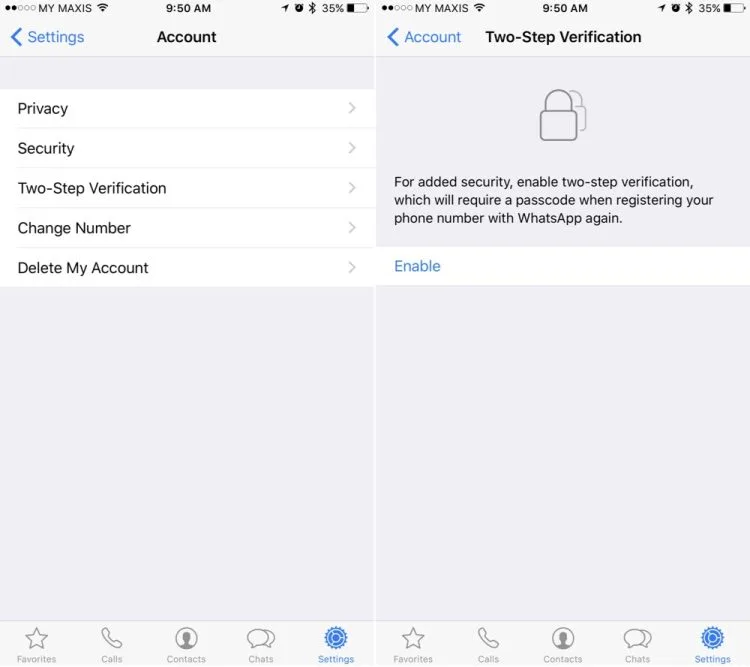
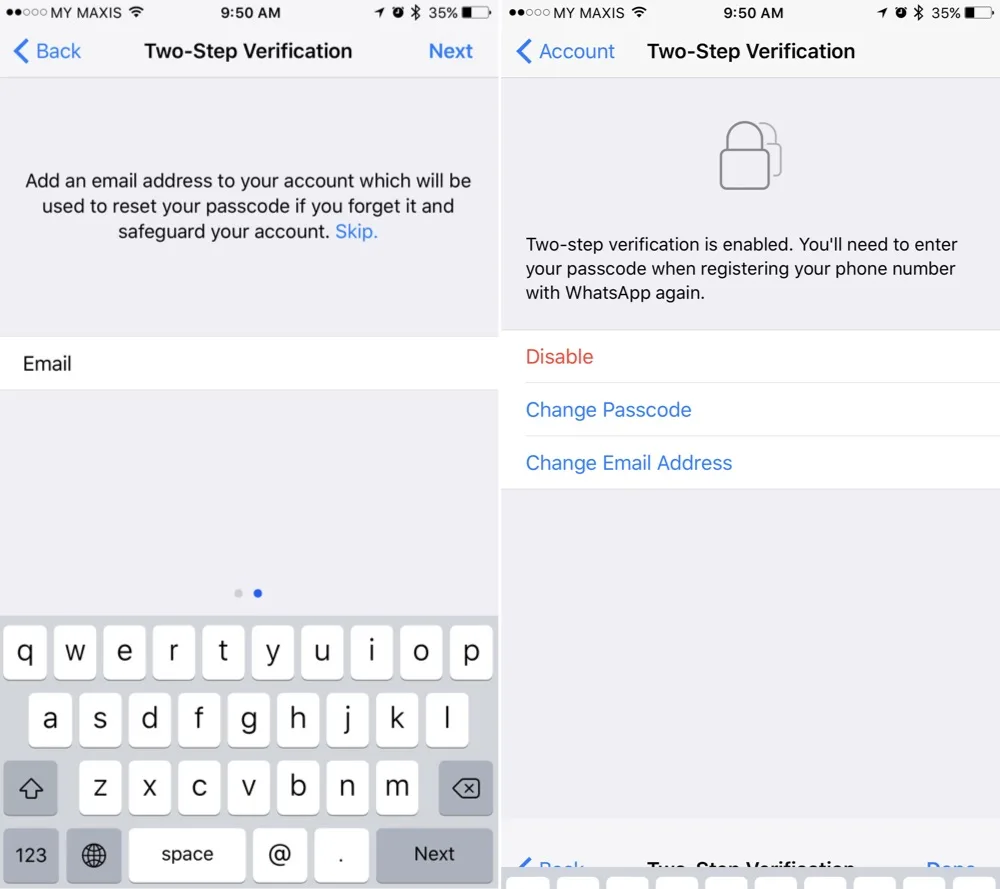
To enable two-step verification, simply open WhatsApp on your smartphone, and tap on Settings. Under Account, enable Two-step verification. You will need to key in a six-digit passcode, as well as your email address. The email address is optional, but WhatsApp recommends that you provide an accurate email address so that if you ever forget your passcode, you can disable the two-step verification feature using your email. Do note that should you ever receive an email requesting to disable two-step verification, but you did not request this, do not click on the link. It means that someone could be attempting to verify your phone number on WhatsApp.
WhatsApp Two Step Verification 2

So what will happen if you did not provide an email address? WhatsApp will not allow you to reverify your account without a passcode for 7 days. After the grace period, you will be able to reverify your WhatsApp phone number without a passcode however, all pending messages in these 7 days will be lost. If your number is reverified on WhatsApp after 30 days of last using Whatsapp, and you do not have the passcode, your account will be deleted and a new one will be created upon successful reverification.

This sounds like a very troublesome feature to turn on, but it’s always better to be safe than sorry. On top of that, WhatsApp will help you remember your passcode by periodically asking you to key in your passcode.

Related Article WhatsApp Reportedly Developing First-Party Encrypted Cloud Backup Service

(Source: WhatsApp)

Filed Under Whatsappwhatsapp securitywhatsapp update
Updated 9:57 am, Mon, 13 February 17
SendShareShareShare2Tweet1

Follow us on Instagram, Facebook, Twitter or Telegram for more updates and breaking news. 

No Result
View All Result

TRENDING THIS WEEK

  1. 1
    Fintech

    BNM To Phase Out Proprietary QR Payment Networks In Malaysia By 2028

  2. 2
    Streaming

    Netflix Now Requires Unique Email For Each Profile Under Shared Accounts

  3. 3
    Transportation

    LRT3 Ditches Tokens For QR Code Tickets, Open Payments Planned For The Future

  4. 4
    Speakers

    Xiaomi Desktop Speaker Pro Set Now Available In Malaysia

  5. 5
    News

    Malaysia’s New Passport Officially Launches

NETWORK

  • Hype
  • Murai
  • Lipstiq
  • Varnam
  • Hangat
  • Autofreaks

ABOUT

  • Advertise
  • Careers
  • Privacy Statement
  • Editorial Policy
  • Terms of Use
  • Contact Us

©2026 VIJANDREN RAMADASS. ALL RIGHTS RESERVED.

No Result
View All Result
  • News
  • Forums
  • Laptops
  • Telco
  • Mobile
  • Gaming
  • Artificial Intelligence
  • Fintech
  • Cryptocurrency
  • Cyber Security
  • Hybrid Vehicles
  • Advertise with Us

©2026 VIJANDREN RAMADASS. ALL RIGHTS RESERVED.

No Result
View All Result
  • News
  • Forums
  • Laptops
  • Telco
  • Mobile
  • Gaming
  • Artificial Intelligence
  • Fintech
  • Cryptocurrency
  • Cyber Security
  • Hybrid Vehicles
  • Advertise with Us

©2026 VIJANDREN RAMADASS. ALL RIGHTS RESERVED.
