
• Hype
  • Murai
  • Lipstiq
  • Varnam
  • Hangat
  • Autofreaks
Lowyat.NET
  • News
    • Lifestyle
    • Computing
    • Hardware
    • Internet
    • Rumours & Leaks
    • Software
  • Forums
    • Kopitiam
    • Tradezone
    • Property Talk
    • Finance & Business
    • Fast and Furious
  • Gaming
    • PC Gaming
    • Console
    • Mobile Gaming
    • Esports
  • Mobile
    • Apps
    • OS
    • Tablets
    • Phones
    • Telco
      • Celcom
      • DiGi
      • Maxis
      • Tune Talk
      • U Mobile
      • Buzzme
  • Pricelists
    • Compu-zoneUpdated
    • ViewnetUpdated
    • Sri ComputersUpdated
    • StartecUpdated
  • More
    • Automotive Tech
    • Drone
    • Enterprise
    • Entertainment
    • Fashion
    • E-Hailing
    • Wearables
    • Contact Us
No Result
View All Result
Lowyat.NET
  • News
    • Lifestyle
    • Computing
    • Hardware
    • Internet
    • Rumours & Leaks
    • Software
  • Forums
    • Kopitiam
    • Tradezone
    • Property Talk
    • Finance & Business
    • Fast and Furious
  • Gaming
    • PC Gaming
    • Console
    • Mobile Gaming
    • Esports
  • Mobile
    • Apps
    • OS
    • Tablets
    • Phones
    • Telco
      • Celcom
      • DiGi
      • Maxis
      • Tune Talk
      • U Mobile
      • Buzzme
  • Pricelists
    • Compu-zoneUpdated
    • ViewnetUpdated
    • Sri ComputersUpdated
    • StartecUpdated
  • More
    • Automotive Tech
    • Drone
    • Enterprise
    • Entertainment
    • Fashion
    • E-Hailing
    • Wearables
    • Contact Us
No Result
View All Result
Lowyat.NET
No Result
View All Result

WhatsApp Web Finally Arrives for iPhone Users

by Huei Song
August 20, 2015
WhatsApp Web for iPhone
Share on WhatsappShare on TelegramThreads

WhatsApp Web for iPhone

At long last, WhatsApp has rolled out WhatsApp Web to iOS, allowing iPhone users to use WhatsApp on their browser.

Just like how things works for WhatsApp Web for other platforms, you will need to open up the “Settings” menu in your WhatsApp for iOS, and select “WhatsApp Web”. Meanwhile, on your browser, visit web.whatsapp.com and you should see a bar code. Tap “OK. Got it.” on your phone, and scan the barcode on your browser. WhatsApp Web will mirror everything from your mobile device to your phone, which means that all of your messages still stay on your phone.
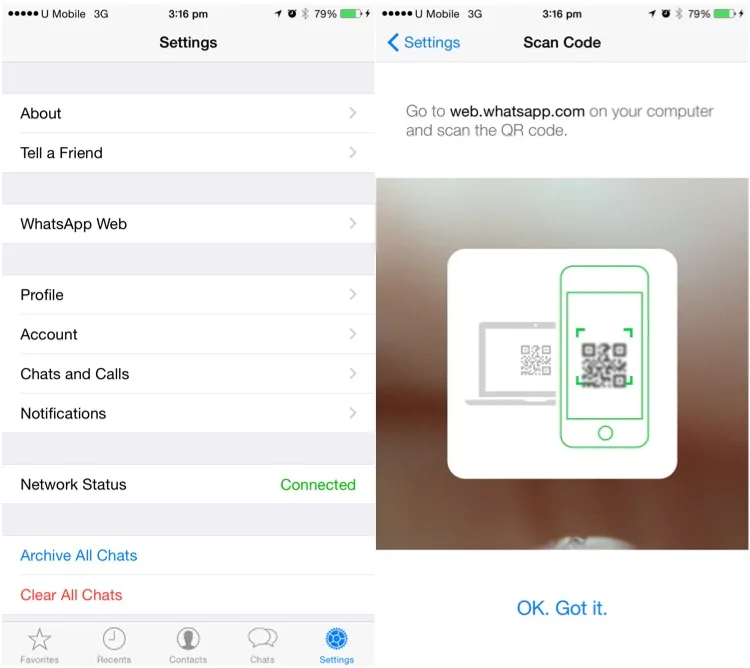
iOS WhatsApp Web

WhatsApp Web was first introduced in January this year, and has been available for every platform including Android, Windows Phone, BlackBerry, BlackBerry 10 and even Symbian. Due to “Apple’s platform limitations”, WhatsApp did not launch the feature for iPhone users back then. It has taken them quite a lot of time, but hey, better late than never right?

iPhone users, check out our guide to help you get started on WhatsApp web.

RELATED:  WhatsApp CarPlay App Officially Rolls Out
Filed Under how to use whatsapp webWhatsappWhatsApp Webwhatsapp web clientwhatsapp web client urlwhatsapp web how to
Updated 3:25 pm, Thu, 20 August 15
SendShareShareShare1Tweet1

Follow us on Instagram, Facebook, Twitter or Telegram for more updates and breaking news. 

No Result
View All Result

TRENDING THIS WEEK

  1. 1
    Computing

    Apple Hikes Prices For Certain Products In Malaysia; Some See An Increase Of Over RM2,000

  2. 2
    Streaming

    Netflix Now Requires Unique Email For Each Profile Under Shared Accounts

  3. 3
    Collectibles

    Tomica Factory Now Part Of KLCC Brand Store Malaysia; First Factory Location Outside Japan

  4. 4
    Transportation

    LRT3 Ditches Tokens For QR Code Tickets, Open Payments Planned For The Future

  5. 5
    News

    Malaysia’s New Passport Officially Launches

NETWORK

  • Hype
  • Murai
  • Lipstiq
  • Varnam
  • Hangat
  • Autofreaks

ABOUT

  • Advertise
  • Careers
  • Privacy Statement
  • Editorial Policy
  • Terms of Use
  • Contact Us

©2026 VIJANDREN RAMADASS. ALL RIGHTS RESERVED.

No Result
View All Result
  • News
  • Forums
  • Laptops
  • Telco
  • Mobile
  • Gaming
  • Fintech
  • Artificial Intelligence
  • Cryptocurrency
  • Cyber Security
  • Hybrid Vehicles
  • Advertise with Us

©2026 VIJANDREN RAMADASS. ALL RIGHTS RESERVED.

No Result
View All Result
  • News
  • Forums
  • Laptops
  • Telco
  • Mobile
  • Gaming
  • Fintech
  • Artificial Intelligence
  • Cryptocurrency
  • Cyber Security
  • Hybrid Vehicles
  • Advertise with Us

©2026 VIJANDREN RAMADASS. ALL RIGHTS RESERVED.