
• Hype
  • Murai
  • Lipstiq
  • Varnam
  • Hangat
  • Autofreaks
Lowyat.NET
  • News
    • Lifestyle
    • Computing
    • Hardware
    • Internet
    • Rumours & Leaks
    • Software
  • Forums
    • Kopitiam
    • Tradezone
    • Property Talk
    • Finance & Business
    • Fast and Furious
  • Gaming
    • PC Gaming
    • Console
    • Mobile Gaming
    • Esports
  • Mobile
    • Apps
    • OS
    • Tablets
    • Phones
    • Telco
      • Celcom
      • DiGi
      • Maxis
      • Tune Talk
      • U Mobile
      • Buzzme
  • Pricelists
    • Compu-zoneUpdated
    • ViewnetUpdated
    • Sri ComputersUpdated
    • StartecUpdated
  • More
    • Automotive Tech
    • Drone
    • Enterprise
    • Entertainment
    • Fashion
    • E-Hailing
    • Wearables
No Result
View All Result
Lowyat.NET
  • News
    • Lifestyle
    • Computing
    • Hardware
    • Internet
    • Rumours & Leaks
    • Software
  • Forums
    • Kopitiam
    • Tradezone
    • Property Talk
    • Finance & Business
    • Fast and Furious
  • Gaming
    • PC Gaming
    • Console
    • Mobile Gaming
    • Esports
  • Mobile
    • Apps
    • OS
    • Tablets
    • Phones
    • Telco
      • Celcom
      • DiGi
      • Maxis
      • Tune Talk
      • U Mobile
      • Buzzme
  • Pricelists
    • Compu-zoneUpdated
    • ViewnetUpdated
    • Sri ComputersUpdated
    • StartecUpdated
  • More
    • Automotive Tech
    • Drone
    • Enterprise
    • Entertainment
    • Fashion
    • E-Hailing
    • Wearables
No Result
View All Result
Lowyat.NET
No Result
View All Result
Home Computing

Get To Know Windows 10: Meet Windows Hello, The Biometric-Based Guardian For Your Device

by Chief Chapree
July 13, 2015
Share on WhatsappShare on TelegramThreads

Windows Hello

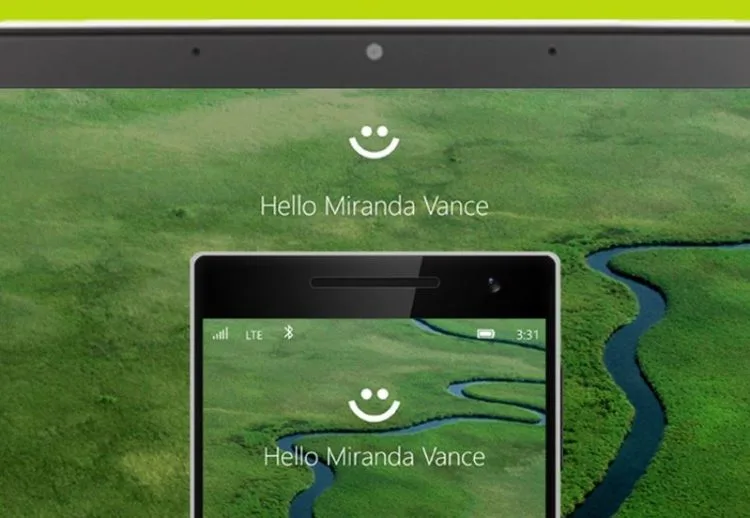
Welcome back to our Get To Know Windows 10 series which kicked off last week by taking a look at the new Start Menu that is one of the latest features in Windows 10. This week, we are going to discuss about Windows 10’s offering of a more personal and natural experience. A classic example of this is in a new feature in the operating system called Windows Hello which is a secure way to access a Windows 10 device.

In general, Windows Hello is a form of biometric implementation on a system level in Windows 10. The idea behind this particular feature is to allow users to log in to their Windows 10 device instantly using their biometrics features such as face, iris, or fingerprint without much hassle or the need to use long passwords.

https://www.youtube.com/watch?v=1AsoSnOmhvU

Additionally, Microsoft stated that the feature is so good to the extent that it is actually able to differentiate between a users’ picture and their actual face or iris. Furthermore, the users’ biometric is secured locally into their devices using enterprise-grade protection.  Since it is quite hard for someone to steal one’s biometric feature, Windows Hello subsequently makes Windows 10 more secure…in theory, at least.

There is one catch though: Windows Hello requires specialized hardware such as an illuminated infrared camera, iris sensor, or a fingerprint reader that supports the Windows Biometric Framework before users are able to use it. This means that users either need to obtain a system that comes standard with such hardware or purchase them separately.

YouTube video

For the same reason, public apperances of Windows Hello outside Microsoft’s own demonstration is rather rare at this moment. Nevertheless, the above demo that was just published by SuperSite for Windows a few days ago perfectly shows what Windows Hello is all about.

[Image: Windows France. Video: Windows and SuperSite for Windows]


It is now your turn to give it a try by becoming a part of the Windows Insider Program and download the Windows 10 Technical Preview for your machine, which you can do so via this link. Then, let us know how your experience with the new Start Menu is like…and who knows, you might be able to win yourself a full Microsoft Surface 3 package!


#MYWindows10StoryClick here to go to this week’s contest!

Filed Under get to know windows 10Windows 10windows 10 tipsWindows Hello
Updated 9:18 pm, Mon, 13 July 15
http://lowy.at/ZHoDF
SendShareShareShare1Tweet1

Follow us on Instagram, Facebook, Twitter or Telegram for more updates and breaking news. 

No Result
View All Result

TRENDING THIS WEEK

  1. 1
    E-Wallet

    TNG eWallet To Discontinue Auto Reload, Quick Payment Via Debit Card Starting 13 May 2026

  2. 2
    Electric Vehicles

    EZI Ray 01 Electric Scooter Lands In Malaysia

  3. 3
    CelcomDigi

    CelcomDigi Will Undergo A 24-Hour System Upgrade On 30 April

  4. 4
    Mobile Phones

    Infinix GT 50 Pro To Launch Next Week With Built-In Liquid Cooling System

  5. 5
    Fintech

    Musk To Turn X Into Super App With Upcoming X Money Banking Tool

NETWORK

  • Hype
  • Murai
  • Lipstiq
  • Varnam
  • Hangat
  • Autofreaks

ABOUT

  • Advertise
  • Careers
  • Privacy Statement
  • Editorial Policy
  • Terms of Use
  • Contact Us

©2026 VIJANDREN RAMADASS. ALL RIGHTS RESERVED.

No Result
View All Result
  • News
  • Forums
  • Laptops
  • Telco
  • Mobile
  • Gaming
  • Fintech
  • Artificial Intelligence
  • Cryptocurrency
  • Cyber Security
  • Hybrid Vehicles
  • Advertise with Us

©2026 VIJANDREN RAMADASS. ALL RIGHTS RESERVED.

No Result
View All Result
  • News
  • Forums
  • Laptops
  • Telco
  • Mobile
  • Gaming
  • Fintech
  • Artificial Intelligence
  • Cryptocurrency
  • Cyber Security
  • Hybrid Vehicles
  • Advertise with Us

©2026 VIJANDREN RAMADASS. ALL RIGHTS RESERVED.