
• Hype
  • Murai
  • Lipstiq
  • Varnam
  • Hangat
  • Autofreaks
Lowyat.NET
  • News
    • Lifestyle
    • Computing
    • Hardware
    • Internet
    • Rumours & Leaks
    • Software
  • Forums
    • Kopitiam
    • Tradezone
    • Property Talk
    • Finance & Business
    • Fast and Furious
  • Gaming
    • PC Gaming
    • Console
    • Mobile Gaming
    • Esports
  • Mobile
    • Apps
    • OS
    • Tablets
    • Phones
    • Telco
      • Celcom
      • DiGi
      • Maxis
      • Tune Talk
      • U Mobile
      • Buzzme
  • Pricelists
    • Compu-zoneUpdated
    • ViewnetUpdated
    • Sri ComputersUpdated
    • StartecUpdated
  • More
    • Automotive Tech
    • Drone
    • Enterprise
    • Entertainment
    • Fashion
    • E-Hailing
    • Wearables
No Result
View All Result
Lowyat.NET
  • News
    • Lifestyle
    • Computing
    • Hardware
    • Internet
    • Rumours & Leaks
    • Software
  • Forums
    • Kopitiam
    • Tradezone
    • Property Talk
    • Finance & Business
    • Fast and Furious
  • Gaming
    • PC Gaming
    • Console
    • Mobile Gaming
    • Esports
  • Mobile
    • Apps
    • OS
    • Tablets
    • Phones
    • Telco
      • Celcom
      • DiGi
      • Maxis
      • Tune Talk
      • U Mobile
      • Buzzme
  • Pricelists
    • Compu-zoneUpdated
    • ViewnetUpdated
    • Sri ComputersUpdated
    • StartecUpdated
  • More
    • Automotive Tech
    • Drone
    • Enterprise
    • Entertainment
    • Fashion
    • E-Hailing
    • Wearables
No Result
View All Result
Lowyat.NET
No Result
View All Result
Home Editorial How-To's

This Is The Registry Hack That Lets You Install Windows 11 On Unsupported PC

It came directly from Microsoft.

by Chief Chapree
October 8, 2021
Share on WhatsappShare on TelegramThreads

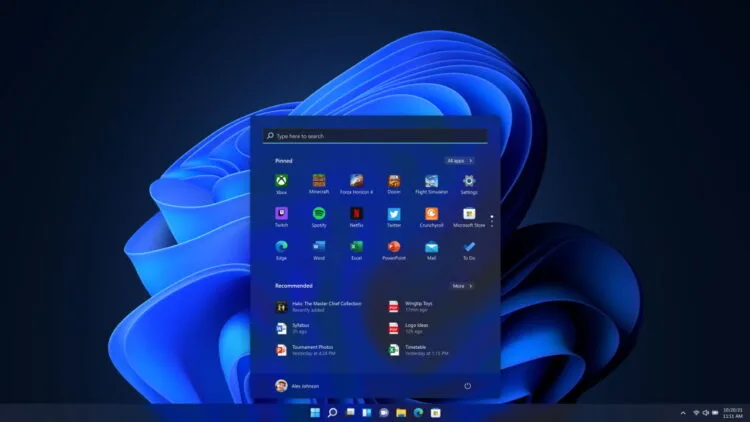
Four months after it was first unveiled to the world, Microsoft unleashed Windows 11 to end users earlier this week. As you may know, the minimum system requirements for the new operating system are not only much higher than its predecessor but is also more stringent, down to the mandatory TPM 2.0 chip and specific lists of supported processors.

Interesting enough, there is a way to bypass the TPM and CPU check and believe it or not, this came directly from Microsoft. All you need to do is add a registry key value into your machine.
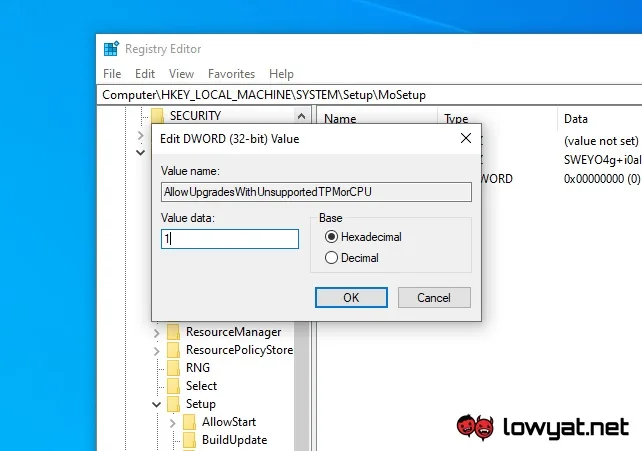
If you decide to do this, do make sure to be careful as your machine could turn haywire if you did something wrong in the Registry Editor. So, here are the steps:

  1. Press the Windows button, type Registry Editor, and click on the search result once the program appears. Alternatively, press Windows + R to open the Run command window, type regedit, and press OK.
  2. Press Yes when User Account Control pops up.
  3. Find HKEY_LOCAL_MACHINE\SYSTEM\Setup\MoSetup.
  4. Right-click on the right-hand panel and choose New > DWORD (32-bit) value.
  5. Type AllowUpgradesWithUnsupportedTPMOrCPU as the Value name.
  6. Type 1 as the Value data. Leave the Base as Hexadecimal.
  7. Press Ok and close the Registry Editor.

Do note that you still need a TPM 1.2 chip to be present and enabled in your machine before you can install Windows 11. Furthermore, Microsoft has said that unsupported PC will not be entitled to updates and that also include security updates.

RELATED:  Microsoft Rolls Out Emergency Fix For Windows 11 Shut Down Bug
Filed Under Windows 11
Updated 11:24 am, Fri, 8 October 21
http://lowy.at/4aJfv
SendShareShareShare2Tweet1

Follow us on Instagram, Facebook, Twitter or Telegram for more updates and breaking news. 

No Result
View All Result

TRENDING THIS WEEK

  1. 1
    Lifestyle

    The Gundam Base Malaysia Is Now Officially Open

  2. 2
    Mobile Phones

    HONOR 600 Series Design Revealed Ahead Of Local Launch

  3. 3
    Mobile Phones

    HONOR 600 Series To Launch In Malaysia Next Week

  4. 4
    Mobile Phones

    Huawei Unveils Pura X Max Design; Comes In Five Different Colours

  5. 5
    News

    Malaysia Still Without Broadcaster For FIFA World Cup 2026

NETWORK

  • Hype
  • Murai
  • Lipstiq
  • Varnam
  • Hangat
  • Autofreaks

ABOUT

  • Advertise
  • Careers
  • Privacy Statement
  • Editorial Policy
  • Terms of Use
  • Contact Us

©2026 VIJANDREN RAMADASS. ALL RIGHTS RESERVED.

No Result
View All Result
  • News
  • Forums
  • Laptops
  • Telco
  • Mobile
  • Gaming
  • Fintech
  • Artificial Intelligence
  • Cryptocurrency
  • Cyber Security
  • Hybrid Vehicles
  • Advertise with Us

©2026 VIJANDREN RAMADASS. ALL RIGHTS RESERVED.

No Result
View All Result
  • News
  • Forums
  • Laptops
  • Telco
  • Mobile
  • Gaming
  • Fintech
  • Artificial Intelligence
  • Cryptocurrency
  • Cyber Security
  • Hybrid Vehicles
  • Advertise with Us

©2026 VIJANDREN RAMADASS. ALL RIGHTS RESERVED.