
• Hype
  • Murai
  • Lipstiq
  • Varnam
  • Hangat
  • Autofreaks
Lowyat.NET
  • News
    • Lifestyle
    • Computing
    • Hardware
    • Internet
    • Rumours & Leaks
    • Software
  • Forums
    • Kopitiam
    • Tradezone
    • Property Talk
    • Finance & Business
    • Fast and Furious
  • Gaming
    • PC Gaming
    • Console
    • Mobile Gaming
    • Esports
  • Mobile
    • Apps
    • OS
    • Tablets
    • Phones
    • Telco
      • Celcom
      • DiGi
      • Maxis
      • Tune Talk
      • U Mobile
      • Buzzme
  • Pricelists
    • Compu-zoneUpdated
    • ViewnetUpdated
    • Sri ComputersUpdated
    • StartecUpdated
  • More
    • Automotive Tech
    • Drone
    • Enterprise
    • Entertainment
    • Fashion
    • E-Hailing
    • Wearables
    • Contact Us
No Result
View All Result
Lowyat.NET
  • News
    • Lifestyle
    • Computing
    • Hardware
    • Internet
    • Rumours & Leaks
    • Software
  • Forums
    • Kopitiam
    • Tradezone
    • Property Talk
    • Finance & Business
    • Fast and Furious
  • Gaming
    • PC Gaming
    • Console
    • Mobile Gaming
    • Esports
  • Mobile
    • Apps
    • OS
    • Tablets
    • Phones
    • Telco
      • Celcom
      • DiGi
      • Maxis
      • Tune Talk
      • U Mobile
      • Buzzme
  • Pricelists
    • Compu-zoneUpdated
    • ViewnetUpdated
    • Sri ComputersUpdated
    • StartecUpdated
  • More
    • Automotive Tech
    • Drone
    • Enterprise
    • Entertainment
    • Fashion
    • E-Hailing
    • Wearables
    • Contact Us
No Result
View All Result
Lowyat.NET
No Result
View All Result

Microsoft Edge To Get Vertical Tabs And Other New Features Later This Month

by Heirul Kamel
March 5, 2021
Microsoft Edge Update Features Vertical Tabs
Share on WhatsappShare on TelegramThreads

Microsoft has revealed that it will be rolling out several new features to its Chromium-based Edge web browser in an upcoming update slated later this month. These include vertical tabs, a side panel for browser history and the sleeping tab feature – all of which were initially released to Edge Dev channel testers four months prior.

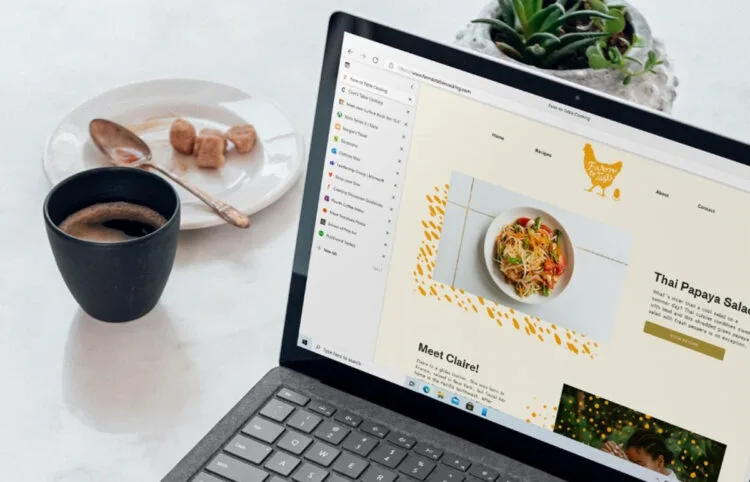
Vertical tabs is something we never knew we needed, especially if we’re hoarding dozens of tabs during a web browsing session. As implied by its name, this new feature allows you to list all of your tabs vertically on the left side, independent from the rest of the browser. This is activated by simply clicking on the tab icon located on the upper left corner, From here, you can close or add tabs and also arrange them as you see fit, much like the original horizontal version.

Best of all, not only does this feature clean up Edge’s upper bar, the vertical tabs pane itself will minimise when not in use – further freeing more room for the active web page window and giving the browser a cleaner and minimalist look. When minimised, all tabs are represented by their respective website’s icon for your reference. 

W10 20H2 Laptop Edge Vertical Tabs 16x9 en US

The next feature is very handy if you’re planning to revisit a particular page from your long list of web browsing history. In the current version of Edge (and Chrome), accessing the browser history will open up a new tab which would take you away from the current website that you’re viewing. To remedy this, Microsoft has introduced a new approach where clicking on the History button in the pull down menu or by pressing CTRL-H will now open up a new miniature pop-up window on top of the browser – displaying a list of previously visited websites that you can scroll through.

This pop up can be maximised, which would display it as an independent column on the right side of the browser. You may choose to close this at any time to free up more screen space by clicking on the “X” button on its top right corner.

W10 20H2 Laptop Edge History Hub 16x9 en US

The third and last new addition to Microsoft Edge is the sleeping tab feature, which runs passively in the background while you browse the web. Having multiple tabs on any web browser open will clog up a computer’s resources and cause slowdowns. This is because each website in their respective tabs are functioning as per usual, even when you have a different page opened in the browser’s main window.

Sleeping tabs remedies this by putting these tabs to, well, sleep by cutting off resources after a certain amount of time of inactivity. This can be set manually by the user via the settings page. Microsoft says that, according to tester feedback, this new feature increases battery life for laptops by using 26% less CPU power on average and also reduces memory usage by 16% on average.

W10 20H2 Laptop Edge Sleeping Tabs 16x9 en US

Needless to say, these new features have granted Microsoft’s web browser an edge (pun intended) to surpass Google Chrome in terms of functionality and efficiency. Not bad for a cloned product with a rocky beginning.

(Source: Microsoft [Official blog])

RELATED:  Microsoft To Release First-Party Xbox "Project Helix" Console
Filed Under EdgeFeaturesmarchmicrosoftMicrosoft EdgeUpdateWeb Browser
Updated 11:00 am, Mon, 8 March 21
SendShareShareShare1Tweet1

Follow us on Instagram, Facebook, Twitter or Telegram for more updates and breaking news. 

No Result
View All Result

TRENDING THIS WEEK

  1. 1
    Computing

    Apple Hikes Prices For Certain Products In Malaysia; Some See An Increase Of Over RM2,000

  2. 2
    Streaming

    Netflix Now Requires Unique Email For Each Profile Under Shared Accounts

  3. 3
    Collectibles

    Tomica Factory Now Part Of KLCC Brand Store Malaysia; First Factory Location Outside Japan

  4. 4
    Transportation

    LRT3 Ditches Tokens For QR Code Tickets, Open Payments Planned For The Future

  5. 5
    News

    Malaysia’s New Passport Officially Launches

NETWORK

  • Hype
  • Murai
  • Lipstiq
  • Varnam
  • Hangat
  • Autofreaks

ABOUT

  • Advertise
  • Careers
  • Privacy Statement
  • Editorial Policy
  • Terms of Use
  • Contact Us

©2026 VIJANDREN RAMADASS. ALL RIGHTS RESERVED.

No Result
View All Result
  • News
  • Forums
  • Laptops
  • Telco
  • Mobile
  • Gaming
  • Fintech
  • Artificial Intelligence
  • Cryptocurrency
  • Cyber Security
  • Hybrid Vehicles
  • Advertise with Us

©2026 VIJANDREN RAMADASS. ALL RIGHTS RESERVED.

No Result
View All Result
  • News
  • Forums
  • Laptops
  • Telco
  • Mobile
  • Gaming
  • Fintech
  • Artificial Intelligence
  • Cryptocurrency
  • Cyber Security
  • Hybrid Vehicles
  • Advertise with Us

©2026 VIJANDREN RAMADASS. ALL RIGHTS RESERVED.