
• Hype
  • Murai
  • Lipstiq
  • Varnam
  • Hangat
  • Autofreaks
Lowyat.NET
  • News
    • Lifestyle
    • Computing
    • Hardware
    • Internet
    • Rumours & Leaks
    • Software
  • Forums
    • Kopitiam
    • Tradezone
    • Property Talk
    • Finance & Business
    • Fast and Furious
  • Gaming
    • PC Gaming
    • Console
    • Mobile Gaming
    • Esports
  • Mobile
    • Apps
    • OS
    • Tablets
    • Phones
    • Telco
      • Celcom
      • DiGi
      • Maxis
      • Tune Talk
      • U Mobile
      • Buzzme
  • Pricelists
    • Compu-zoneUpdated
    • ViewnetUpdated
    • Sri ComputersUpdated
    • StartecUpdated
  • More
    • Automotive Tech
    • Drone
    • Enterprise
    • Entertainment
    • Fashion
    • E-Hailing
    • Wearables
No Result
View All Result
Lowyat.NET
  • News
    • Lifestyle
    • Computing
    • Hardware
    • Internet
    • Rumours & Leaks
    • Software
  • Forums
    • Kopitiam
    • Tradezone
    • Property Talk
    • Finance & Business
    • Fast and Furious
  • Gaming
    • PC Gaming
    • Console
    • Mobile Gaming
    • Esports
  • Mobile
    • Apps
    • OS
    • Tablets
    • Phones
    • Telco
      • Celcom
      • DiGi
      • Maxis
      • Tune Talk
      • U Mobile
      • Buzzme
  • Pricelists
    • Compu-zoneUpdated
    • ViewnetUpdated
    • Sri ComputersUpdated
    • StartecUpdated
  • More
    • Automotive Tech
    • Drone
    • Enterprise
    • Entertainment
    • Fashion
    • E-Hailing
    • Wearables
No Result
View All Result
Lowyat.NET
No Result
View All Result
Home News Internet

Microsoft Edge Has Built In Parental Controls With Kids Mode

by Ian Chee
April 16, 2021
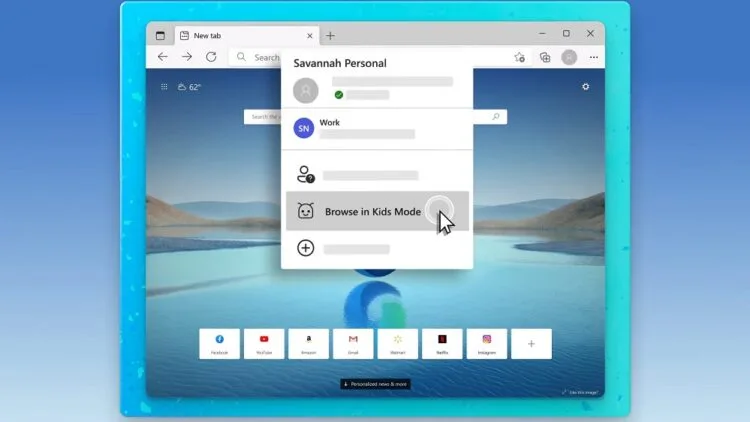
Microsoft Edge Kids Mode

Kids Mode on Microsoft Edge (Image: Microsoft)

Share on WhatsappShare on TelegramThreads

The internet is both a treasure trove of and a cesspool, especially for kids. To make things easier for parents, Microsoft has added to its Edge browser what it calls Kids Mode. And it’s essentially a built-in parental controls mode for the browser.

Engaging Kids Mode on the Microsoft Edge browser is as simple as switching to its dedicated profile. Following that, you pick from two age ranges, five to eight or nine to 12. The former naturally features stricter controls by default. The higher age range adds a news feed to the browsing experience, curated from MSN for Kids. More serious topics like politics will still be filtered out, but you can expect to find articles on science left in.
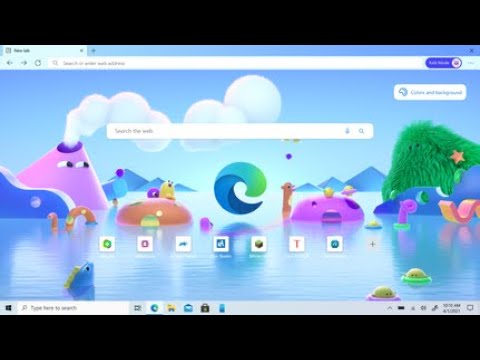
YouTube video

Both come with the highest level of tracking prevention and strict Bing SafeSearch. There are also 70 websites in the whitelist, though you have the option to add more. If your child goes to a site that’s not allowed, Microsoft Edge will put up a block page that asks them to get permission from an adult.

To turn off Kids Mode, you’ll have to re-enter your Windows or macOS password to turn it off. On Windows, it goes a step further by disabling a number of Windows keyboard shortcuts. The Verge says that the feature will be out on the Microsoft Edge browser today, but at the time of writing we don’t have access to it yet.

(Source: Microsoft / YouTube via The Verge)

RELATED:  Report: Microsoft To Refresh Surface Pro, Laptop Lines With New Chips, Better Display
Filed Under browserEdgeInternetkids modemicrosoftParental Controls
Updated 5:53 pm, Fri, 16 April 21
http://lowy.at/rFAJO
SendShareShareShare2Tweet1

Follow us on Instagram, Facebook, Twitter or Telegram for more updates and breaking news. 

No Result
View All Result

TRENDING THIS WEEK

  1. 1
    E-Wallet

    TNG eWallet To Discontinue Auto Reload, Quick Payment Via Debit Card Starting 13 May 2026

  2. 2
    Electric Vehicles

    EZI Ray 01 Electric Scooter Lands In Malaysia

  3. 3
    CelcomDigi

    CelcomDigi Will Undergo A 24-Hour System Upgrade On 30 April

  4. 4
    News

    Jalan Bukit Bintang To Close From 29 April To 2 May

  5. 5
    Apps

    MyJPJ App Update Brings New Features, Including A Chatbot

NETWORK

  • Hype
  • Murai
  • Lipstiq
  • Varnam
  • Hangat
  • Autofreaks

ABOUT

  • Advertise
  • Careers
  • Privacy Statement
  • Editorial Policy
  • Terms of Use
  • Contact Us

©2026 VIJANDREN RAMADASS. ALL RIGHTS RESERVED.

No Result
View All Result
  • News
  • Forums
  • Laptops
  • Telco
  • Mobile
  • Gaming
  • Fintech
  • Artificial Intelligence
  • Cryptocurrency
  • Cyber Security
  • Hybrid Vehicles
  • Advertise with Us

©2026 VIJANDREN RAMADASS. ALL RIGHTS RESERVED.

No Result
View All Result
  • News
  • Forums
  • Laptops
  • Telco
  • Mobile
  • Gaming
  • Fintech
  • Artificial Intelligence
  • Cryptocurrency
  • Cyber Security
  • Hybrid Vehicles
  • Advertise with Us

©2026 VIJANDREN RAMADASS. ALL RIGHTS RESERVED.