

• Hype
  • Murai
  • Lipstiq
  • Varnam
  • Hangat
  • Autofreaks
Lowyat.NET
  • News
    • Lifestyle
    • Computing
    • Hardware
    • Internet
    • Rumours & Leaks
    • Software
  • Forums
    • Kopitiam
    • Tradezone
    • Property Talk
    • Finance & Business
    • Fast and Furious
  • Gaming
    • PC Gaming
    • Console
    • Esports
  • Mobile
    • Apps
    • OS
    • Tablets
    • Phones
    • Telco
      • Celcom
      • DiGi
      • Maxis
      • Tune Talk
      • U Mobile
      • Buzzme
  • Pricelists
    • Compu-zoneUpdated
    • ViewnetUpdated
    • Sri ComputersUpdated
    • StartecUpdated
  • More
    • Automotive Tech
    • Drone
    • Enterprise
    • Entertainment
    • Fashion
    • E-Hailing
    • Wearables
No Result
View All Result
Lowyat.NET
  • News
    • Lifestyle
    • Computing
    • Hardware
    • Internet
    • Rumours & Leaks
    • Software
  • Forums
    • Kopitiam
    • Tradezone
    • Property Talk
    • Finance & Business
    • Fast and Furious
  • Gaming
    • PC Gaming
    • Console
    • Esports
  • Mobile
    • Apps
    • OS
    • Tablets
    • Phones
    • Telco
      • Celcom
      • DiGi
      • Maxis
      • Tune Talk
      • U Mobile
      • Buzzme
  • Pricelists
    • Compu-zoneUpdated
    • ViewnetUpdated
    • Sri ComputersUpdated
    • StartecUpdated
  • More
    • Automotive Tech
    • Drone
    • Enterprise
    • Entertainment
    • Fashion
    • E-Hailing
    • Wearables
No Result
View All Result
Lowyat.NET
No Result
View All Result
Home Mobile Apps

This Is How You Can Enable Disappearing Messages On WhatsApp

by Chief Chapree
November 3, 2020
Share on WhatsappShare on TelegramThreads

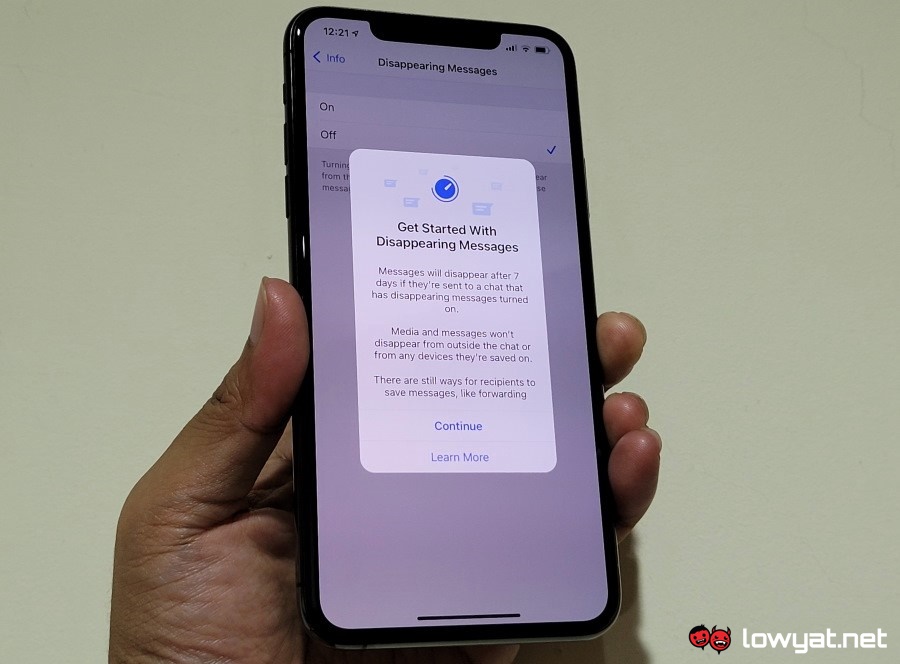
After being on trial for so long, WhatsApp is finally rolling out the Disappearing Messages to more users throughout the world. It is being done rather quietly though, so you may not notice its appearance inside your device.

In general, what Disappearing Messages do is that you can now choose to have a message to automatically disappear seven days after you’ve received it. Aside from individual messages, the feature is also available for group chat too although the option can only be activated by the group admin.

The Disappearing Messages feature is available on all platforms that WhatsApp currently supports including Android, iPhone, Web, Windows, macOS, and even KaiOS. Regardless of the platforms though, the general method to activate the feature is rather similar.
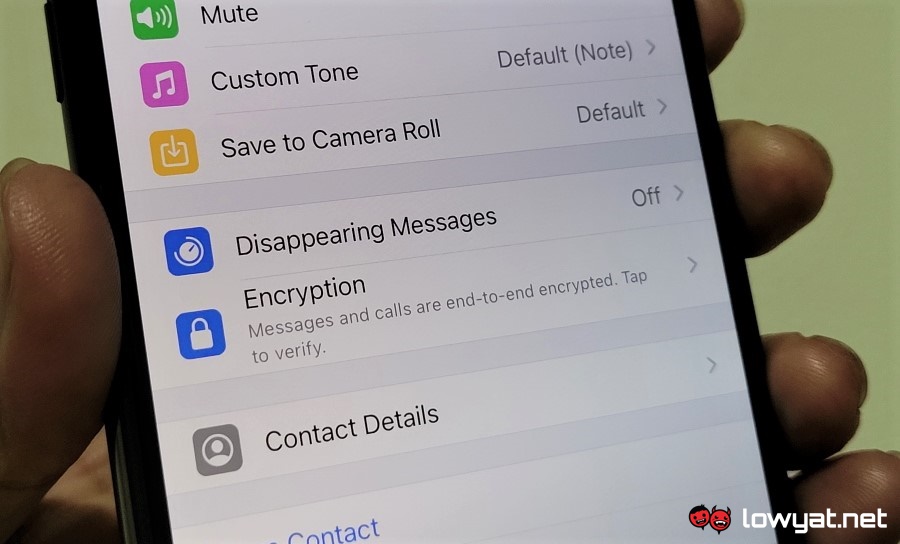
All you need to do is open up the chat, tap on the contact’s name, choose the Disappearing Messages option, and turn it on or off as desired. For group chat admin, open your group, tap on its name, and you should see the same option.

Meanwhile, there are a couple of things you have to take note regarding the new Disappearing Messages feature though. First, this is not a universal feature which means that you have to activate it with each of your contacts individually. Additionally, the media that comes with the messages will remain inside your device even though the message has disappeared unless you disable the Auto-Download option inside WhatsApp.
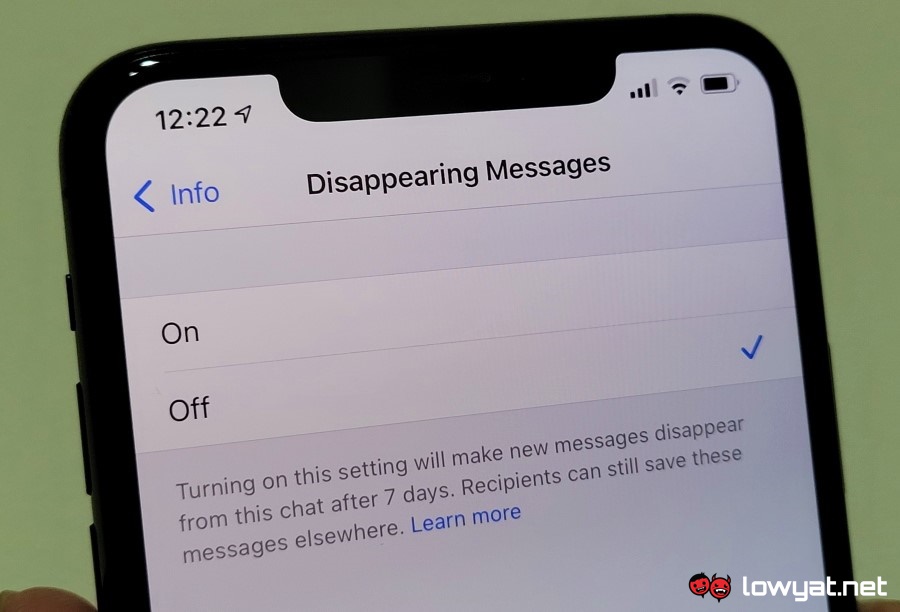
Not only that, there are also several scenarios whereby the message will continue to be around even after seven days. Among them includes if the said message has been forwarded into a chat with Disappearing Messages option turned off as well as if the message is part of a quoted reply.

RELATED:  WhatsApp Adds Dual Account Support On iOS, iOS To Android Chat Transfer

Not to forget, there is also the issue of screenshotting the message before it disappears. So, we do recommend you to check out the official Disappearing Messages’ FAQ from WhatsApp to really understand the new feature before you start using it in your daily conversation.

Filed Under disappearing messagesWhatsapp
Updated 12:59 pm, Wed, 4 November 20
http://lowy.at/qWj6g
SendShareShareShare2Tweet1

Follow us on Instagram, Facebook, Twitter or Telegram for more updates and breaking news. 

No Result
View All Result

TRENDING THIS WEEK

  1. 1
    Mobile Phones

    OPPO Find X9 Ultra To Get April Launch In Malaysia

  2. 2
    Reviews

    Tecno Camon 50 Ultra Review: A Fancy Facade

  3. 3
    Mobile

    OnePlus Reportedly Ceasing Global Operations As Early As April 2026

  4. 4
    Mobile Phones

    realme 16 Pro Series To Arrive In Malaysia Soon; Pre-Orders Now Open

  5. 5
    News

    You Can Now Print Documents At Select 7-Eleven Malaysia Outlets

NETWORK

  • Hype
  • Murai
  • Lipstiq
  • Varnam
  • Hangat
  • Autofreaks

ABOUT

  • Advertise
  • Careers
  • Privacy Statement
  • Contact Us
  • Editorial Policy
  • Terms & Conditions

©2026 VIJANDREN RAMADASS. ALL RIGHTS RESERVED.

No Result
View All Result
  • News
    • Lifestyle
    • Computing
    • Hardware
    • Internet
    • Rumours & Leaks
    • Software
  • Forums
    • Kopitiam
    • Tradezone
    • Property Talk
    • Finance & Business
    • Fast and Furious
  • Gaming
    • PC Gaming
    • Console
    • Esports
  • Mobile
    • Apps
    • OS
    • Tablets
    • Phones
    • Telco
      • Celcom
      • DiGi
      • Maxis
      • Tune Talk
      • U Mobile
      • Buzzme
  • Pricelists
    • Compu-zone
    • Viewnet
    • Sri Computers
    • Startec
  • More
    • Automotive Tech
    • Drone
    • Enterprise
    • Entertainment
    • Fashion
    • E-Hailing
    • Wearables

©2026 VIJANDREN RAMADASS. ALL RIGHTS RESERVED.

No Result
View All Result
  • News
    • Lifestyle
    • Computing
    • Hardware
    • Internet
    • Rumours & Leaks
    • Software
  • Forums
    • Kopitiam
    • Tradezone
    • Property Talk
    • Finance & Business
    • Fast and Furious
  • Gaming
    • PC Gaming
    • Console
    • Esports
  • Mobile
    • Apps
    • OS
    • Tablets
    • Phones
    • Telco
      • Celcom
      • DiGi
      • Maxis
      • Tune Talk
      • U Mobile
      • Buzzme
  • Pricelists
    • Compu-zone
    • Viewnet
    • Sri Computers
    • Startec
  • More
    • Automotive Tech
    • Drone
    • Enterprise
    • Entertainment
    • Fashion
    • E-Hailing
    • Wearables

©2026 VIJANDREN RAMADASS. ALL RIGHTS RESERVED.