

• Hype
  • Murai
  • Lipstiq
  • Wanista
  • Varnam
  • Hangat
  • Autofreaks
Lowyat.NET
  • News
    • Lifestyle
    • Computing
    • Hardware
    • Internet
    • Rumours & Leaks
    • Software
  • Forums
    • Kopitiam
    • Tradezone
    • Property Talk
    • Finance & Business
    • Fast and Furious
  • Gaming
    • PC Gaming
    • Console
    • Esports
  • Mobile
    • Apps
    • OS
    • Tablets
    • Phones
    • Telco
      • Celcom
      • DiGi
      • Maxis
      • Tune Talk
      • U Mobile
      • Buzzme
  • Pricelists
    • Compu-zoneUpdated
    • ViewnetUpdated
    • Sri ComputersUpdated
    • StartecUpdated
  • More
    • Automotive Tech
    • Drone
    • Enterprise
    • Entertainment
    • Fashion
    • E-Hailing
    • Wearables
No Result
View All Result
Lowyat.NET
  • News
    • Lifestyle
    • Computing
    • Hardware
    • Internet
    • Rumours & Leaks
    • Software
  • Forums
    • Kopitiam
    • Tradezone
    • Property Talk
    • Finance & Business
    • Fast and Furious
  • Gaming
    • PC Gaming
    • Console
    • Esports
  • Mobile
    • Apps
    • OS
    • Tablets
    • Phones
    • Telco
      • Celcom
      • DiGi
      • Maxis
      • Tune Talk
      • U Mobile
      • Buzzme
  • Pricelists
    • Compu-zoneUpdated
    • ViewnetUpdated
    • Sri ComputersUpdated
    • StartecUpdated
  • More
    • Automotive Tech
    • Drone
    • Enterprise
    • Entertainment
    • Fashion
    • E-Hailing
    • Wearables
No Result
View All Result
Lowyat.NET
No Result
View All Result
Home Mobile Apps

App Updates: Dropbox for iOS and Google+ for Android

by Huei Song
December 17, 2012
Share on FacebookShare on Twitter

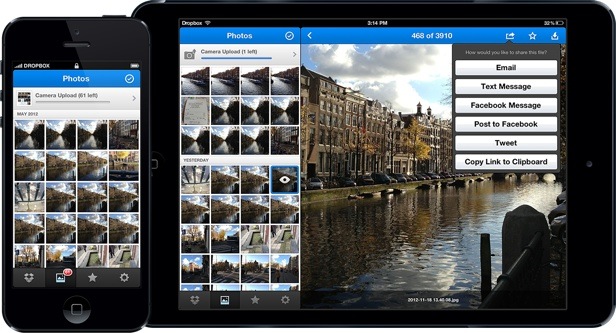
It looks like Dropbox has finally released a much-needed update to its iOS app that brings timeline to photos and a new design to make it easier for you to upload files. Once you update the app from the iTunes store, you will be greeted with a new Photos tab that sorts all your precious images in a timeline view. When you select an image to view, you will be able to enjoy it in a full-screen glory and scroll through the rest of the images. A notable change here is that even if you have “billions and billions” of pictures in a folder, Dropbox now comes with a new “speedy scroller” that allows you to navigate back to your earliest photos in just seconds. Another new feature that comes with the update is the ability to upload directly to folder. Just navigate to the folder you want (new or existing), and tap on the “+” button to upload files there. Check out Dropbox to find out more on what’s new or update your app now via the App Store.

As for things over at Google, the company released an update for its Google+ app for Android and iOS. Android users can now take advantage of the full-size photo upload, allowing them to share images of up to 5GB. The update also allows all Google+ users using Android Froyo and above to enjoy Photo Sphere images though, you’ll still need an Android 4.2 device to grab these 360-degree panoramic pictures. Hangout has also been tweaked to allow users with just 150KB of bandwidth to participate in a Hangout.

ALSO READ:  Google Expands Gemini In Chrome For US Subscribers With Auto Browse

Unfortunately though, while iOS users do not get all these fancy updates, the new version comes with a new design for an improved photo viewing experience. The interface has also been changed to resemble the Android version. Check out the Google+ blog for more information.

(Source: GSMArena, Dropbox, Google+)

Filed Under AndroidDropboxGoogleiOSPhoto Sphere
Updated 10:55 am, Mon, 17 December 12
https://lowy.at/ypo4m
Share1Tweet1SendShare

Follow us on Instagram, Facebook, Twitter or Telegram for more updates and breaking news. 

No Result
View All Result

TRENDING THIS WEEK

  1. 1
    Mobile Phones

    Tecno Camon 50 Ultra Debuts At MWC 2026 With Dimensity 7400 Ultimate, 6,500mAh Battery

  2. 2
    Mobile Phones

    Infinix Note 60 Pro Now Official In Malaysia From RM1,199

  3. 3
    Apps

    MyJPJ’s MyDigital ID Implementation Postponed Yet Again; Now Set For 1 May 2026

  4. 4
    Banking

    Account Lockouts: Maybank Says Challenge Questions Triggered By Fraud Monitoring

  5. 5
    Hands On

    Huawei Mate 80 Pro Hands On: The Return Of the Mate Series

NETWORK

  • Hype
  • Murai
  • Lipstiq
  • Wanista
  • Varnam
  • Hangat
  • Autofreaks

ABOUT

  • Advertise
  • Careers
  • Privacy Statement
  • Contact Us
  • Editorial Policy
  • Terms & Conditions

©2026 VIJANDREN RAMADASS. ALL RIGHTS RESERVED.

No Result
View All Result
  • News
    • Lifestyle
    • Computing
    • Hardware
    • Internet
    • Rumours & Leaks
    • Software
  • Forums
    • Kopitiam
    • Tradezone
    • Property Talk
    • Finance & Business
    • Fast and Furious
  • Gaming
    • PC Gaming
    • Console
    • Esports
  • Mobile
    • Apps
    • OS
    • Tablets
    • Phones
    • Telco
      • Celcom
      • DiGi
      • Maxis
      • Tune Talk
      • U Mobile
      • Buzzme
  • Pricelists
    • Compu-zone
    • Viewnet
    • Sri Computers
    • Startec
  • More
    • Automotive Tech
    • Drone
    • Enterprise
    • Entertainment
    • Fashion
    • E-Hailing
    • Wearables

©2026 VIJANDREN RAMADASS. ALL RIGHTS RESERVED.

No Result
View All Result
  • News
    • Lifestyle
    • Computing
    • Hardware
    • Internet
    • Rumours & Leaks
    • Software
  • Forums
    • Kopitiam
    • Tradezone
    • Property Talk
    • Finance & Business
    • Fast and Furious
  • Gaming
    • PC Gaming
    • Console
    • Esports
  • Mobile
    • Apps
    • OS
    • Tablets
    • Phones
    • Telco
      • Celcom
      • DiGi
      • Maxis
      • Tune Talk
      • U Mobile
      • Buzzme
  • Pricelists
    • Compu-zone
    • Viewnet
    • Sri Computers
    • Startec
  • More
    • Automotive Tech
    • Drone
    • Enterprise
    • Entertainment
    • Fashion
    • E-Hailing
    • Wearables

©2026 VIJANDREN RAMADASS. ALL RIGHTS RESERVED.