
• Hype
  • Murai
  • Lipstiq
  • Varnam
  • Hangat
  • Autofreaks
Lowyat.NET
  • News
    • Lifestyle
    • Computing
    • Hardware
    • Internet
    • Rumours & Leaks
    • Software
  • Forums
    • Kopitiam
    • Tradezone
    • Property Talk
    • Finance & Business
    • Fast and Furious
  • Gaming
    • PC Gaming
    • Console
    • Mobile Gaming
    • Esports
  • Mobile
    • Apps
    • OS
    • Tablets
    • Phones
    • Telco
      • Celcom
      • DiGi
      • Maxis
      • Tune Talk
      • U Mobile
      • Buzzme
  • Pricelists
    • Compu-zoneUpdated
    • ViewnetUpdated
    • Sri ComputersUpdated
    • StartecUpdated
  • More
    • Automotive Tech
    • Drone
    • Enterprise
    • Entertainment
    • Fashion
    • E-Hailing
    • Wearables
No Result
View All Result
Lowyat.NET
  • News
    • Lifestyle
    • Computing
    • Hardware
    • Internet
    • Rumours & Leaks
    • Software
  • Forums
    • Kopitiam
    • Tradezone
    • Property Talk
    • Finance & Business
    • Fast and Furious
  • Gaming
    • PC Gaming
    • Console
    • Mobile Gaming
    • Esports
  • Mobile
    • Apps
    • OS
    • Tablets
    • Phones
    • Telco
      • Celcom
      • DiGi
      • Maxis
      • Tune Talk
      • U Mobile
      • Buzzme
  • Pricelists
    • Compu-zoneUpdated
    • ViewnetUpdated
    • Sri ComputersUpdated
    • StartecUpdated
  • More
    • Automotive Tech
    • Drone
    • Enterprise
    • Entertainment
    • Fashion
    • E-Hailing
    • Wearables
No Result
View All Result
Lowyat.NET
No Result
View All Result
Home Computing

Got an Overheating MacBook Pro? Put It in the Oven and Drill Holes In It

by Andrew Cheng
December 30, 2014
Share on WhatsappShare on TelegramThreads

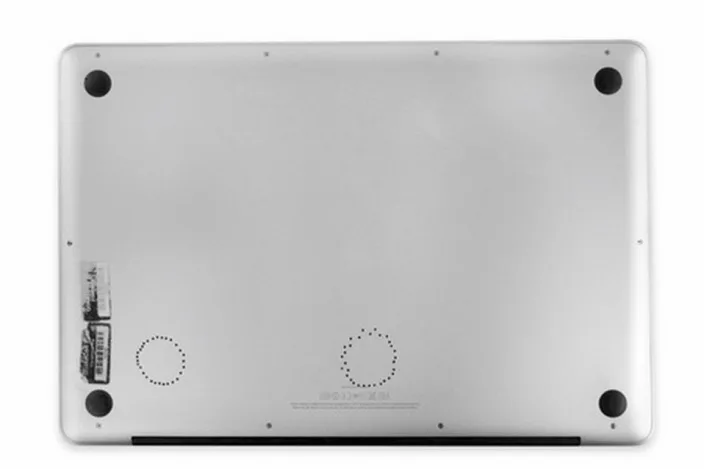
macbook-drill-1

It may sound crazy and rather sarcastic, but a MacBook Pro owner has successfully fixed his unit by baking it in the oven and drilling as many as 60 holes under it. Before you run off to the store to get an oven and a drill, you might want to read on to find out how exactly he did this.

An iFixit programmer by the name of Sterling decided to take matters into his own hands when his MacBook Pro died one fateful day back in March 2014. He decided to reflow his MacBook’s logic board to fix it. Reflowing is the practice of melting all the solder on the circuit board in the hopes that it will settle and reconnect any broken connections. Sterling accomplished this by baking it in the oven at about 170°C.

I cracked open the back of my laptop, disconnected all eleven connectors and three heat sinks from the logic board, and turned the oven up to 340º F. I put my $900 part on a cookie sheet and baked it for seven nerveracking minutes.
After it cooled, I reapplied thermal paste, put it all back together, and cheered when it booted. It ran great for the next eight months. Temperatures averaged in the 60s and 70s C—although recently, they began creeping up again.

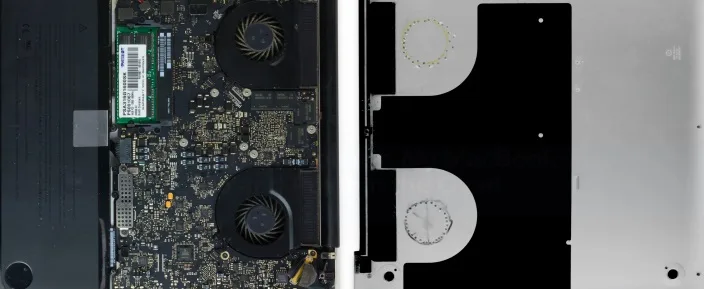
After his initial fix no longer worked, he decided to take it a step further and drilled two rings of holes under his MacBook Pro. The result? There’s noticeably increased airflow along with a much lower running temperature. When Sterling put a piece of paper on the bottom of the MacBook, it sticks to the case. For a do-it-yourself fix, this result is pretty amazing.
RELATED:  Apple 14- And 16-Inch MacBook Pro With M5 Pro And M5 Max In Malaysia From RM8,999

macbook-drill-2

Sterling went on to say that while it is too early to tell if this fix is a permanent solution, his Macbook Pro has been running fine for the past 15 days. If you want a more detailed look at his fix, visit his iFixit blog post here.

Perhaps Apple can learn a thing or two from Sterling’s unconventional fix. A word of warning though: unless you know precisely what you are doing, we definitely do not suggest anyone to do this to their MacBook Pro.

(Source: iFixit Blog via 9to5Mac)

Filed Under apple macbookapple macbook proifixitMacBook Pro
Updated 1:06 pm, Tue, 30 December 14
http://lowy.at/HirJB
SendShareShareShare2Tweet1

Follow us on Instagram, Facebook, Twitter or Telegram for more updates and breaking news. 

No Result
View All Result

TRENDING THIS WEEK

  1. 1
    E-Wallet

    TNG eWallet To Discontinue Auto Reload, Quick Payment Via Debit Card Starting 13 May 2026

  2. 2
    Electric Vehicles

    EZI Ray 01 Electric Scooter Lands In Malaysia

  3. 3
    CelcomDigi

    CelcomDigi Will Undergo A 24-Hour System Upgrade On 30 April

  4. 4
    Mobile Phones

    Infinix GT 50 Pro To Launch Next Week With Built-In Liquid Cooling System

  5. 5
    Fintech

    Musk To Turn X Into Super App With Upcoming X Money Banking Tool

NETWORK

  • Hype
  • Murai
  • Lipstiq
  • Varnam
  • Hangat
  • Autofreaks

ABOUT

  • Advertise
  • Careers
  • Privacy Statement
  • Editorial Policy
  • Terms of Use
  • Contact Us

©2026 VIJANDREN RAMADASS. ALL RIGHTS RESERVED.

No Result
View All Result
  • News
  • Forums
  • Laptops
  • Telco
  • Mobile
  • Gaming
  • Fintech
  • Artificial Intelligence
  • Cryptocurrency
  • Cyber Security
  • Hybrid Vehicles
  • Advertise with Us

©2026 VIJANDREN RAMADASS. ALL RIGHTS RESERVED.

No Result
View All Result
  • News
  • Forums
  • Laptops
  • Telco
  • Mobile
  • Gaming
  • Fintech
  • Artificial Intelligence
  • Cryptocurrency
  • Cyber Security
  • Hybrid Vehicles
  • Advertise with Us

©2026 VIJANDREN RAMADASS. ALL RIGHTS RESERVED.