

• Hype
  • Murai
  • Lipstiq
  • Wanista
  • Varnam
  • Hangat
  • Autofreaks
Lowyat.NET
  • News
    • Lifestyle
    • Computing
    • Hardware
    • Internet
    • Rumours & Leaks
    • Software
  • Forums
    • Kopitiam
    • Tradezone
    • Property Talk
    • Finance & Business
    • Fast and Furious
  • Gaming
    • PC Gaming
    • Console
    • Esports
  • Mobile
    • Apps
    • OS
    • Tablets
    • Phones
    • Telco
      • Celcom
      • DiGi
      • Maxis
      • Tune Talk
      • U Mobile
      • Buzzme
  • Pricelists
    • Compu-zoneUpdated
    • ViewnetUpdated
    • Sri ComputersUpdated
    • StartecUpdated
  • More
    • Automotive Tech
    • Drone
    • Enterprise
    • Entertainment
    • Fashion
    • E-Hailing
    • Wearables
No Result
View All Result
Lowyat.NET
  • News
    • Lifestyle
    • Computing
    • Hardware
    • Internet
    • Rumours & Leaks
    • Software
  • Forums
    • Kopitiam
    • Tradezone
    • Property Talk
    • Finance & Business
    • Fast and Furious
  • Gaming
    • PC Gaming
    • Console
    • Esports
  • Mobile
    • Apps
    • OS
    • Tablets
    • Phones
    • Telco
      • Celcom
      • DiGi
      • Maxis
      • Tune Talk
      • U Mobile
      • Buzzme
  • Pricelists
    • Compu-zoneUpdated
    • ViewnetUpdated
    • Sri ComputersUpdated
    • StartecUpdated
  • More
    • Automotive Tech
    • Drone
    • Enterprise
    • Entertainment
    • Fashion
    • E-Hailing
    • Wearables
No Result
View All Result
Lowyat.NET
No Result
View All Result
Home Mobile Apps

Adobe Brings Lightroom To The iPad; Syncing And Editing On The Go!

by Lucas Lau
April 8, 2014
Share on FacebookShare on Twitter

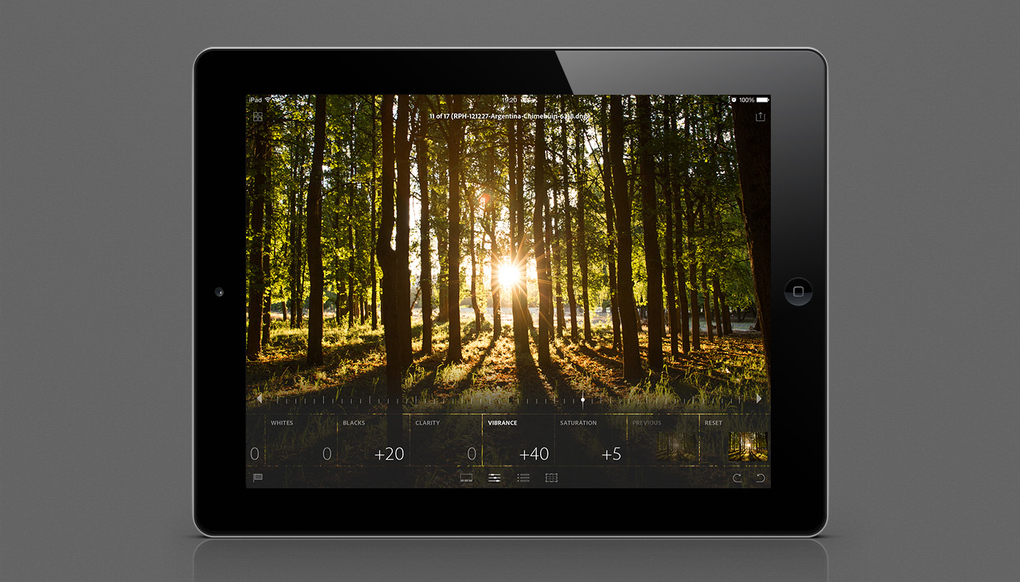
lr-mobile_ipad_edit_snapshots_to_raw_1400x800_verge_super_wide

The Adobe Creative Cloud just got a lot more useful with the release of Adobe Lightroom Mobile for iPad. The tablet version of the very popular photo organization and editing software uses the creative cloud to sync images and edits to and from your desktop system making sure your photos are always up to date.

The mobile version of Lightroom is no gimped version of a powerful program rather it can do just about all the basic things the desktop version can and just about everything you truly need to do on a mobile platform anyway. How it works is that you will need Lightroom 5 installed on your main machine and from there you can select whichever collection you want to sync across to your iPad. From there, through the magic of the Creative Cloud, it gets synced across, right down to your edits.
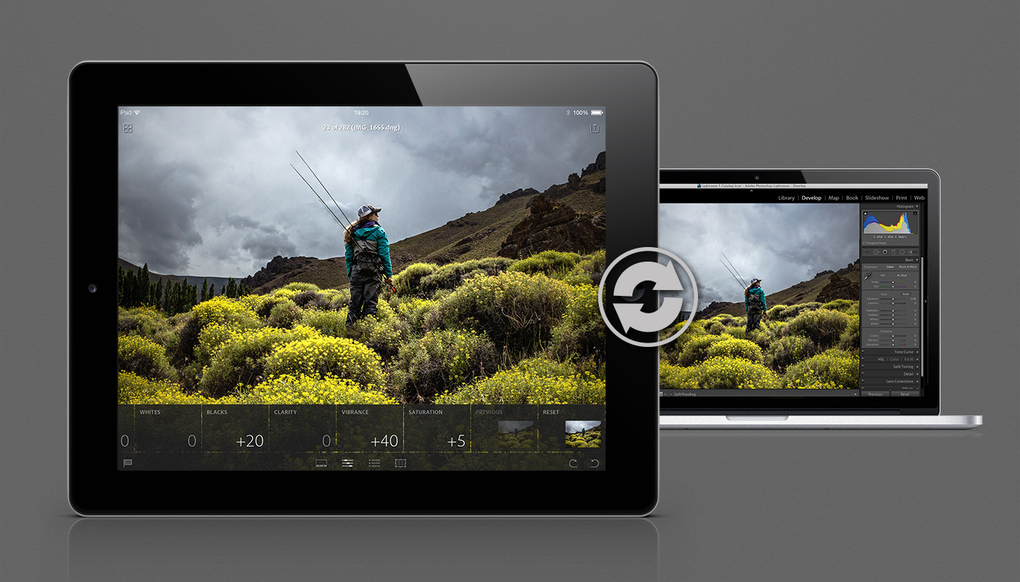
lr-mobile_ipad_sync_1400x800_verge_super_wide

The wonderful thing is that with the use of Smart Previews in Lightroom you can work with RAW files pretty quickly and with not that much memory footprint on your iPad. This app is one of the best things to slot into my workflow and the fact that you can do selects and edits on the go and then sync back to your machine when back in studio is fantastic!

To take full advantage of Lightroom for mobile, you’ll need to be subscribed to the Creative Cloud with the photography plan at the minimum. The app is free on the app store and if you want a full rundown on how to get started, head over to Adobe’s site here!

RELATED:  AI Head John Giannandrea To Exit Apple Amid Siri Hiccups
Filed Under AdobeAdobe LightroomAppleiOSiPadLightroom MobilemobilePhoto Editing
Updated 4:28 pm, Tue, 8 April 14
http://lowy.at/uyNaD
Share1Tweet1SendShare

Follow us on Instagram, Facebook, Twitter or Telegram for more updates and breaking news. 

No Result
View All Result

TRENDING THIS WEEK

  1. 1
    E-commerce

    Shopee Seller Threatens To Dox Buyer After GPU Price Dispute

  2. 2
    Mobile Phones

    Tecno Camon 50 Ultra Debuts At MWC 2026 With Dimensity 7400 Ultimate, 6,500mAh Battery

  3. 3
    Android Phones

    Huawei Mate 80 Pro Launches In Malaysia With RM3,999 Price Tag

  4. 4
    News

    ZDATA’s RM8 Billion Johor AI Data Centre Earns Malaysia’s First GreenRE Platinum Rating

  5. 5
    E-commerce

    Shopee Shares Shipping Deadlines For Orders To Arrive Before Hari Raya Aidilfitri

NETWORK

  • Hype
  • Murai
  • Lipstiq
  • Wanista
  • Varnam
  • Hangat
  • Autofreaks

ABOUT

  • Advertise
  • Careers
  • Privacy Statement
  • Contact Us
  • Editorial Policy
  • Terms & Conditions

©2026 VIJANDREN RAMADASS. ALL RIGHTS RESERVED.

No Result
View All Result
  • News
    • Lifestyle
    • Computing
    • Hardware
    • Internet
    • Rumours & Leaks
    • Software
  • Forums
    • Kopitiam
    • Tradezone
    • Property Talk
    • Finance & Business
    • Fast and Furious
  • Gaming
    • PC Gaming
    • Console
    • Esports
  • Mobile
    • Apps
    • OS
    • Tablets
    • Phones
    • Telco
      • Celcom
      • DiGi
      • Maxis
      • Tune Talk
      • U Mobile
      • Buzzme
  • Pricelists
    • Compu-zone
    • Viewnet
    • Sri Computers
    • Startec
  • More
    • Automotive Tech
    • Drone
    • Enterprise
    • Entertainment
    • Fashion
    • E-Hailing
    • Wearables

©2026 VIJANDREN RAMADASS. ALL RIGHTS RESERVED.

No Result
View All Result
  • News
    • Lifestyle
    • Computing
    • Hardware
    • Internet
    • Rumours & Leaks
    • Software
  • Forums
    • Kopitiam
    • Tradezone
    • Property Talk
    • Finance & Business
    • Fast and Furious
  • Gaming
    • PC Gaming
    • Console
    • Esports
  • Mobile
    • Apps
    • OS
    • Tablets
    • Phones
    • Telco
      • Celcom
      • DiGi
      • Maxis
      • Tune Talk
      • U Mobile
      • Buzzme
  • Pricelists
    • Compu-zone
    • Viewnet
    • Sri Computers
    • Startec
  • More
    • Automotive Tech
    • Drone
    • Enterprise
    • Entertainment
    • Fashion
    • E-Hailing
    • Wearables

©2026 VIJANDREN RAMADASS. ALL RIGHTS RESERVED.