

• Hype
  • Murai
  • Lipstiq
  • Wanista
  • Varnam
  • Hangat
  • Autofreaks
Lowyat.NET
  • News
    • Lifestyle
    • Computing
    • Hardware
    • Internet
    • Rumours & Leaks
    • Software
  • Forums
    • Kopitiam
    • Tradezone
    • Property Talk
    • Finance & Business
    • Fast and Furious
  • Gaming
    • PC Gaming
    • Console
    • Esports
  • Mobile
    • Apps
    • OS
    • Tablets
    • Phones
    • Telco
      • Celcom
      • DiGi
      • Maxis
      • Tune Talk
      • U Mobile
      • Buzzme
  • Pricelists
    • Compu-zoneUpdated
    • ViewnetUpdated
    • Sri ComputersUpdated
    • StartecUpdated
  • More
    • Automotive Tech
    • Drone
    • Enterprise
    • Entertainment
    • Fashion
    • E-Hailing
    • Wearables
No Result
View All Result
Lowyat.NET
  • News
    • Lifestyle
    • Computing
    • Hardware
    • Internet
    • Rumours & Leaks
    • Software
  • Forums
    • Kopitiam
    • Tradezone
    • Property Talk
    • Finance & Business
    • Fast and Furious
  • Gaming
    • PC Gaming
    • Console
    • Esports
  • Mobile
    • Apps
    • OS
    • Tablets
    • Phones
    • Telco
      • Celcom
      • DiGi
      • Maxis
      • Tune Talk
      • U Mobile
      • Buzzme
  • Pricelists
    • Compu-zoneUpdated
    • ViewnetUpdated
    • Sri ComputersUpdated
    • StartecUpdated
  • More
    • Automotive Tech
    • Drone
    • Enterprise
    • Entertainment
    • Fashion
    • E-Hailing
    • Wearables
No Result
View All Result
Lowyat.NET
No Result
View All Result
Home Mobile Apps

Google Search for Android Now Allow Users to Take Photos Using “OK Google” Command

by Huei Song
March 20, 2014
Share on FacebookShare on Twitter

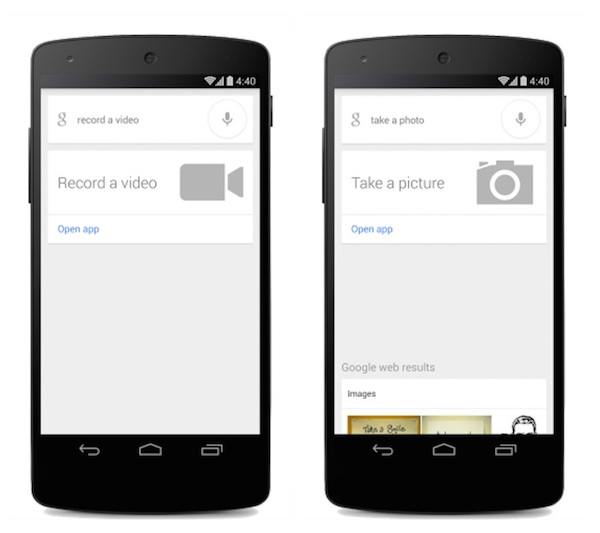
OK google take picture and video

You know how sometimes you’re in dire need to capture a picture immediately but your hands are occupied and trying to take a picture with one hand can be a little tricky? No problem, Google has just rolled out an update to its Google Search app for Android that allows you to capture pictures and videos using the “OK Google” command.

For those who have an Android device running on Android 4.1 or higher, the next time you wish to take a picture or a video, just open the Google Search app on your phone and activate Google by saying “OK Google” followed by “take a photo” or “take a video”. Google will launch the camera app on your device and do as told, it will even open your preferred mode so it can capture whatever you want exactly the way you want it.

Sadly, taking a picture or video does not exactly take them, Google will only activate your camera app in the respective mode but you’ll still have to tap on the shutter button yourself to actually capture something. For those who are not keen on opening the search app and talking to your phone like a weirdo, you can always use the conventional method of tapping the camera app instead. Nonetheless, it’s great to see Google constantly improving its voice command capabilities and let’s keep our fingers crossed that they’ll bring in more commands in the near future, you know, so your future Android Wear device will be even better than what we’re seeing now.

(Source: Pocket-lint)

Filed Under CameraGooglegoogle voiceok google
Updated 10:31 am, Thu, 20 March 14
https://lowy.at/KBaT8
Share1Tweet1SendShare

Follow us on Instagram, Facebook, Twitter or Telegram for more updates and breaking news. 

No Result
View All Result

TRENDING THIS WEEK

  1. 1
    Mobile Phones

    Tecno Camon 50 Ultra Debuts At MWC 2026 With Dimensity 7400 Ultimate, 6,500mAh Battery

  2. 2
    Banking

    Account Lockouts: Maybank Says Challenge Questions Triggered By Fraud Monitoring

  3. 3
    E-commerce

    Shopee Seller Threatens To Dox Buyer After GPU Price Dispute

  4. 4
    Mobile Phones

    Infinix Unveils Note 60 Ultra; Designed By Coachbuilder Firm Pininfarina

  5. 5
    Mobile Phones

    Nothing Announces Phone (4a) Lineup; Features 5,080mAh Battery

NETWORK

  • Hype
  • Murai
  • Lipstiq
  • Wanista
  • Varnam
  • Hangat
  • Autofreaks

ABOUT

  • Advertise
  • Careers
  • Privacy Statement
  • Contact Us
  • Editorial Policy
  • Terms & Conditions

©2026 VIJANDREN RAMADASS. ALL RIGHTS RESERVED.

No Result
View All Result
  • News
    • Lifestyle
    • Computing
    • Hardware
    • Internet
    • Rumours & Leaks
    • Software
  • Forums
    • Kopitiam
    • Tradezone
    • Property Talk
    • Finance & Business
    • Fast and Furious
  • Gaming
    • PC Gaming
    • Console
    • Esports
  • Mobile
    • Apps
    • OS
    • Tablets
    • Phones
    • Telco
      • Celcom
      • DiGi
      • Maxis
      • Tune Talk
      • U Mobile
      • Buzzme
  • Pricelists
    • Compu-zone
    • Viewnet
    • Sri Computers
    • Startec
  • More
    • Automotive Tech
    • Drone
    • Enterprise
    • Entertainment
    • Fashion
    • E-Hailing
    • Wearables

©2026 VIJANDREN RAMADASS. ALL RIGHTS RESERVED.

No Result
View All Result
  • News
    • Lifestyle
    • Computing
    • Hardware
    • Internet
    • Rumours & Leaks
    • Software
  • Forums
    • Kopitiam
    • Tradezone
    • Property Talk
    • Finance & Business
    • Fast and Furious
  • Gaming
    • PC Gaming
    • Console
    • Esports
  • Mobile
    • Apps
    • OS
    • Tablets
    • Phones
    • Telco
      • Celcom
      • DiGi
      • Maxis
      • Tune Talk
      • U Mobile
      • Buzzme
  • Pricelists
    • Compu-zone
    • Viewnet
    • Sri Computers
    • Startec
  • More
    • Automotive Tech
    • Drone
    • Enterprise
    • Entertainment
    • Fashion
    • E-Hailing
    • Wearables

©2026 VIJANDREN RAMADASS. ALL RIGHTS RESERVED.