

• Hype
  • Murai
  • Lipstiq
  • Varnam
  • Hangat
  • Autofreaks
Lowyat.NET
  • News
    • Lifestyle
    • Computing
    • Hardware
    • Internet
    • Rumours & Leaks
    • Software
  • Forums
    • Kopitiam
    • Tradezone
    • Property Talk
    • Finance & Business
    • Fast and Furious
  • Gaming
    • PC Gaming
    • Console
    • Esports
  • Mobile
    • Apps
    • OS
    • Tablets
    • Phones
    • Telco
      • Celcom
      • DiGi
      • Maxis
      • Tune Talk
      • U Mobile
      • Buzzme
  • Pricelists
    • Compu-zoneUpdated
    • ViewnetUpdated
    • Sri ComputersUpdated
    • StartecUpdated
  • More
    • Automotive Tech
    • Drone
    • Enterprise
    • Entertainment
    • Fashion
    • E-Hailing
    • Wearables
No Result
View All Result
Lowyat.NET
  • News
    • Lifestyle
    • Computing
    • Hardware
    • Internet
    • Rumours & Leaks
    • Software
  • Forums
    • Kopitiam
    • Tradezone
    • Property Talk
    • Finance & Business
    • Fast and Furious
  • Gaming
    • PC Gaming
    • Console
    • Esports
  • Mobile
    • Apps
    • OS
    • Tablets
    • Phones
    • Telco
      • Celcom
      • DiGi
      • Maxis
      • Tune Talk
      • U Mobile
      • Buzzme
  • Pricelists
    • Compu-zoneUpdated
    • ViewnetUpdated
    • Sri ComputersUpdated
    • StartecUpdated
  • More
    • Automotive Tech
    • Drone
    • Enterprise
    • Entertainment
    • Fashion
    • E-Hailing
    • Wearables
No Result
View All Result
Lowyat.NET
No Result
View All Result
Home Mobile Apps

[LYTV] Hotlink Red App Walkthrough

by Pang Tun Yau
June 10, 2014
Share on WhatsappShare on TelegramThreads
YouTube video

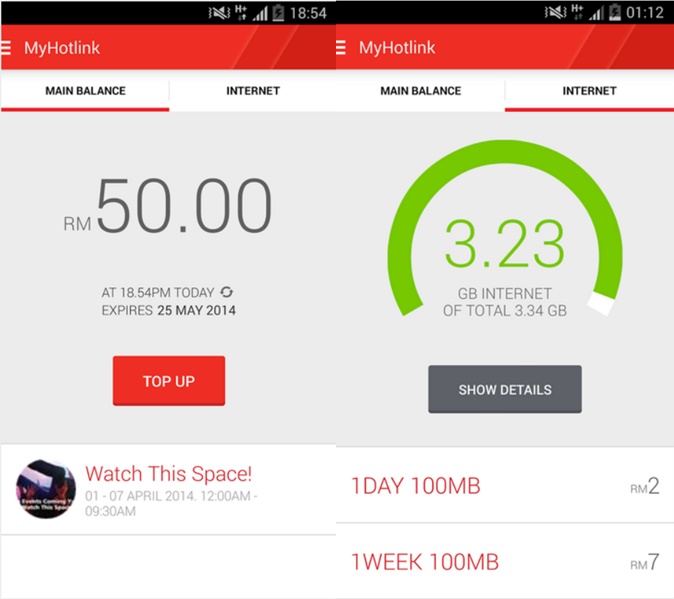
Maxis recently released the Hotlink RED app, which helps #Hotlink subscribers manage their accounts in a more efficient and modern manner. With the Hotlink RED app, users won’t need to key in tedious USSD codes to check balance, top up, or purchase mobile data.

The app is also designed to be as user-intuitive as possible, but if you’re having trouble navigating your way around the app, here’s a walkthrough from one of the app’s developers.

RELATED:  Maxis Adds Bahasa Malaysia Support To Its In-App Miya AI Assistant
Filed Under Hotlinkhotlink apphotlink redhotlink red appLowyatLowyatTVLYTVMaxismaxis app
Updated 2:37 am, Tue, 10 June 14
https://lowy.at/4maoI
SendShareShareShare1Tweet1

Follow us on Instagram, Facebook, Twitter or Telegram for more updates and breaking news. 

No Result
View All Result

TRENDING THIS WEEK

  1. 1
    Fintech

    TNG Digital Retracts RON95 Subsidy Initiative, Issues Apology

  2. 2
    Fintech

    TNG eWallet Gets Physical Customer Service Hub At Kota Raya

  3. 3
    Automotive

    BYD Reportedly Reconsidering Tanjung Malim CKD Plans

  4. 4
    Telco

    China Mobile’s CMLink Now Offers Prepaid Plans In Malaysia; Priced From RM25/Month

  5. 5
    Automotive

    Tesla Officially Launches Model Y L In Malaysia; Pricing To Start From RM260,000

NETWORK

  • Hype
  • Murai
  • Lipstiq
  • Varnam
  • Hangat
  • Autofreaks

ABOUT

  • Advertise
  • Careers
  • Privacy Statement
  • Editorial Policy
  • Terms of Use
  • Contact Us

©2026 VIJANDREN RAMADASS. ALL RIGHTS RESERVED.

No Result
View All Result
  • News
  • Forums
  • Laptops
  • Telco
  • Mobile
  • Gaming
  • Banking
  • Fintech
  • Artificial Intelligence
  • Cryptocurrency
  • Cyber Security
  • Hybrid Vehicles
  • Advertise with Us

©2026 VIJANDREN RAMADASS. ALL RIGHTS RESERVED.

No Result
View All Result
  • News
  • Forums
  • Laptops
  • Telco
  • Mobile
  • Gaming
  • Banking
  • Fintech
  • Artificial Intelligence
  • Cryptocurrency
  • Cyber Security
  • Hybrid Vehicles
  • Advertise with Us

©2026 VIJANDREN RAMADASS. ALL RIGHTS RESERVED.